What you will learn + 실습 랩
ORVIXCODE · FULL LEARNING SYSTEM
OrvixCode 아카데미
Master OrvixCode from first launch to professional repository workflows. Learn by reading, practicing, testing and finishing real projects.
42강의
8학습 경로
14+시간
0완료
Academy Dashboard
0%Progress is stored locally in your browser. No account is required. Tip: press Ctrl/⌘ + K to search.
Overview
Inside this academy
Learn by doing
Follow the full curriculum or focus on the skill area you need today.
Use the lesson in a real OrvixCode workspace instead of only reading it.
Progress is stored locally in your browser. No account is required.
Finish the academy with larger projects that combine multiple OrvixCode skills.
Desktop · Mobile · RTL · Search · Local progress
Skill map
Choose a learning path
Follow the full curriculum or focus on the skill area you need today.
초급 · 7 강의
01 · Foundations
Install OrvixCode, understand the interface and build a reliable first-project workflow.
중급 · 6 강의
02 · AI Coding Workflow
Use Ask, Edit, Agent, the editor, terminal and undo flow without losing control of changes.
중급 · 5 강의
03 · VS Code Integration
Bring OrvixCode into VS Code and learn selection, context, Agent and synchronization workflows.
고급 · 7 강의
04 · Models & Context
Choose Viona, cloud providers, local models and Combo intelligently; manage context and long code.
고급 · 5 강의
05 · Project Productivity
Work with GitHub, backups, sessions, settings and keyboard workflows on real repositories.
전문가 · 4 강의
06 · Security & Control
Protect API keys, permissions and repository boundaries while keeping AI productive.
전문가 · 5 강의
07 · Troubleshooting
Diagnose provider, VS Code, local-model and application failures using evidence instead of guesses.
고급 · 3 강의
08 · Platform & Release Operations
Understand Learn, service status, releases and how the OrvixCode platform communicates changes.
일치하는 강의가 없습니다.
Level · 초급
01 · Foundations
Install OrvixCode, understand the interface and build a reliable first-project workflow.
WorkspaceProjectsChat
1 개요개요 — OrvixCode의 기술 사용법, 구성 및 워크플로 안내입니다.
개요 — OrvixCode의 기술 사용법, 구성 및 워크플로 안내입니다.
OrvixCode is a Windows desktop development environment that connects AI chat with real projects, files, editor workflows, and a built-in terminal.
You can open or create projects, analyze and edit code with AI, run multi-file project tasks, and choose between supported local or cloud models.
Core capabilities
- Planning and continuation for long-code and large-project tasks.
- Multi-file project generation with dependency-aware manifest validation.
- Syntax-highlighted code editor, Problems area, AI Fix, and inline AI editing.
- Built-in terminal with AI-assisted terminal error analysis.
- Automatic installation and retry for missing Python packages using the same interpreter.
- Explain, edit, and fix selected code.
- Customizable keyboard shortcuts, response stopping, and Markdown formatting while streaming.
- Local Ollama models, cloud providers, Combo Mode, and Visual Studio Code integration.
You stay in controlAI-prepared file changes retain preview, permission, apply, backup, and undo workflows.
What you will learn 01Workspace · 개요
What you will learn 02Projects · 실습 랩
What you will learn 03진행률 · Diff · Test · Review
실습 랩
Use the lesson in a real OrvixCode workspace instead of only reading it.
1Open a small real project and identify where this lesson applies.
2Ask OrvixCode to explain the current state before making changes.
3Apply one controlled change and verify it with the project’s real checks.
Apply the “개요” concept to this project. Inspect and explain the current state first. Do not touch unrelated files. Make the smallest safe change, run the relevant build/test/terminal verification, and summarize the real result.
2 시스템 요구 사항시스템 요구 사항 — OrvixCode의 기술 사용법, 구성 및 워크플로 안내입니다.
시스템 요구 사항 — OrvixCode의 기술 사용법, 구성 및 워크플로 안내입니다.
| Component | Requirement / recommendation |
|---|---|
| Operating system | Windows 10 or Windows 11 |
| Architecture | 64-bit |
| Internet | Required for cloud AI providers and downloading local models. Previously downloaded Ollama models can run locally without internet access. |
| RAM | The desktop app has modest requirements; local AI memory use depends heavily on model size and context length. |
| GPU / VRAM | Optional for local models, but a compatible GPU can significantly improve performance. |
| Disk | Allow space for the app, projects, backups, and downloaded local models. |
| VS Code | Only required if you use the VS Code integration. |
Local AI noteModel speed and compatibility depend on RAM, VRAM, GPU support, free disk space, and context size. Very large models may not fit on lower-memory systems.
What you will learn 01Workspace · 시스템 요구 사항
What you will learn 02Projects · 실습 랩
What you will learn 03진행률 · Diff · Test · Review
실습 랩
Use the lesson in a real OrvixCode workspace instead of only reading it.
1Open a small real project and identify where this lesson applies.
2Ask OrvixCode to explain the current state before making changes.
3Apply one controlled change and verify it with the project’s real checks.
Apply the “시스템 요구 사항” concept to this project. Inspect and explain the current state first. Do not touch unrelated files. Make the smallest safe change, run the relevant build/test/terminal verification, and summarize the real result.
3 설치설치 — OrvixCode의 기술 사용법, 구성 및 워크플로 안내입니다.
설치 — OrvixCode의 기술 사용법, 구성 및 워크플로 안내입니다.
Download the current Windows installer from the official OrvixCode product page.
https://orvixcode.orvixgames.com/download.php?lang=ko-kr
- Download the installerOpen the OrvixCode product page and download the current Windows build.
- Run SetupIf Windows shows a security prompt, verify the source before continuing.
- Choose the install locationKeep the default path or select another supported location.
- Enable VS Code integrationIf Setup offers to install or update the extension, keep the option enabled if you use VS Code.
- Finish installationLaunch OrvixCode from the desktop shortcut or Start menu.
What you will learn 01Workspace · 설치
What you will learn 02Projects · 실습 랩
What you will learn 03진행률 · Diff · Test · Review
실습 랩
Use the lesson in a real OrvixCode workspace instead of only reading it.
1Open a small real project and identify where this lesson applies.
2Ask OrvixCode to explain the current state before making changes.
3Apply one controlled change and verify it with the project’s real checks.
Apply the “설치” concept to this project. Inspect and explain the current state first. Do not touch unrelated files. Make the smallest safe change, run the relevant build/test/terminal verification, and summarize the real result.
4 첫 실행첫 실행 — OrvixCode의 기술 사용법, 구성 및 워크플로 안내입니다.
첫 실행 — OrvixCode의 기술 사용법, 구성 및 워크플로 안내입니다.
On first launch, OrvixCode may show setup preferences such as application language, workspace location, and basic behavior.
After setup, the main workspace lets you add a project, start a new chat, or configure AI providers and local models.
What you will learn 01Workspace · 첫 실행
What you will learn 02Projects · 실습 랩
What you will learn 03진행률 · Diff · Test · Review
실습 랩
Use the lesson in a real OrvixCode workspace instead of only reading it.
1Open a small real project and identify where this lesson applies.
2Ask OrvixCode to explain the current state before making changes.
3Apply one controlled change and verify it with the project’s real checks.
Apply the “첫 실행” concept to this project. Inspect and explain the current state first. Do not touch unrelated files. Make the smallest safe change, run the relevant build/test/terminal verification, and summarize the real result.
5 인터페이스인터페이스 — OrvixCode의 기술 사용법, 구성 및 워크플로 안내입니다.
인터페이스 — OrvixCode의 기술 사용법, 구성 및 워크플로 안내입니다.
Left navigation
The left side gives quick access to projects, chats, tools, and main application areas. It can be collapsed when you need more editor space.
Tabs
Keep multiple chats or workspaces open at the same time. Closing a tab does not necessarily delete the saved chat.
AI chat area
Manage your prompt, active model, and project context here. Responses can also show affected files and the state of proposed edits.
What you will learn 01Workspace · 인터페이스
What you will learn 02Projects · 실습 랩
What you will learn 03진행률 · Diff · Test · Review
실습 랩
Use the lesson in a real OrvixCode workspace instead of only reading it.
1Open a small real project and identify where this lesson applies.
2Ask OrvixCode to explain the current state before making changes.
3Apply one controlled change and verify it with the project’s real checks.
Apply the “인터페이스” concept to this project. Inspect and explain the current state first. Do not touch unrelated files. Make the smallest safe change, run the relevant build/test/terminal verification, and summarize the real result.
6 프로젝트프로젝트 — OrvixCode의 기술 사용법, 구성 및 워크플로 안내입니다.
프로젝트 — OrvixCode의 기술 사용법, 구성 및 워크플로 안내입니다.
OrvixCode projects are based on local folders. When a folder is selected as the workspace, AI can use task-relevant project context.
New or existing project
- Create a workspace with New Project.
- Attach an existing source-code folder directly.
- Use + New project from the project selector below the message box.
Automatic project creation for AI tasks
If you ask OrvixCode to generate a project and no real project is selected, it can create a project folder and add it to Projects. Duplicate names receive suffixes such as Project 2 or Project 3.
File planning for large projects
Large tasks are split into subsystems and files instead of being compressed into a few oversized files. Imports and dependency contracts are checked while generation proceeds; the manifest can expand when a missing local module is discovered.
Context scopeVery large folders are not sent in full with every request. OrvixCode tries to select the files and sections relevant to the task.
What you will learn 01Workspace · 프로젝트
What you will learn 02Projects · 실습 랩
What you will learn 03진행률 · Diff · Test · Review
실습 랩
Use the lesson in a real OrvixCode workspace instead of only reading it.
1Open a small real project and identify where this lesson applies.
2Ask OrvixCode to explain the current state before making changes.
3Apply one controlled change and verify it with the project’s real checks.
Apply the “프로젝트” concept to this project. Inspect and explain the current state first. Do not touch unrelated files. Make the smallest safe change, run the relevant build/test/terminal verification, and summarize the real result.
7 AI 채팅AI 채팅 — OrvixCode의 기술 사용법, 구성 및 워크플로 안내입니다.
AI 채팅 — OrvixCode의 기술 사용법, 구성 및 워크플로 안내입니다.
Use AI chat to ask project questions, analyze errors, generate code, edit files, or request architecture suggestions.
File and selected-code context
Use the + menu in the composer to attach files. Attached text/code files are explicitly exposed to the AI as available context, and selected-code explanation requests are kept separate from project-generation intent.
Stop a response
While AI is responding, the send control changes to ■ Stop. Stopping cancels continuation and large-project generation steps and prevents late output from being appended.
Streaming view
Markdown and code blocks are formatted while the response streams instead of only after completion. Long user messages preserve line breaks and code blocks.
Prompt example
Review the authentication system in this project.
Find possible failures during session refresh.
If needed, edit the relevant files and explain the changes.
What you will learn 01Workspace · AI 채팅
What you will learn 02Projects · 실습 랩
What you will learn 03진행률 · Diff · Test · Review
실습 랩
Use the lesson in a real OrvixCode workspace instead of only reading it.
1Open a small real project and identify where this lesson applies.
2Ask OrvixCode to explain the current state before making changes.
3Apply one controlled change and verify it with the project’s real checks.
Apply the “AI 채팅” concept to this project. Inspect and explain the current state first. Do not touch unrelated files. Make the smallest safe change, run the relevant build/test/terminal verification, and summarize the real result.
Track checkpoint · 01 · Foundations
Before moving on, complete these tasks without relying on guesswork.
- Explain the key ideas of this path in your own words.
- Complete one real task using the workflow from this path.
- Verify your result with evidence such as a diff, test, build or terminal output.
Level · 중급
02 · AI Coding Workflow
Use Ask, Edit, Agent, the editor, terminal and undo flow without losing control of changes.
AskEditAgentTerminal
8 Ask / Edit / AgentAsk / Edit / Agent — OrvixCode의 기술 사용법, 구성 및 워크플로 안내입니다.
Ask / Edit / Agent — OrvixCode의 기술 사용법, 구성 및 워크플로 안내입니다.
Ask
Questions, explanations, analysis, and edit requests when appropriate.
Edit
Focused changes to the active file. Best for single-file tasks.
Agent
Multi-file work, new files, and broader project-level tasks.
Editing from Ask
Ask is not limited to explanations. When your prompt clearly requests a code change, OrvixCode can prepare an actionable edit package.
Example“Fix the error handling in this file and remove unnecessary duplication.” can trigger an analysis + edit flow.
What you will learn 01Ask · Ask / Edit / Agent
What you will learn 02Edit · 실습 랩
What you will learn 03진행률 · Diff · Test · Review
실습 랩
Use the lesson in a real OrvixCode workspace instead of only reading it.
1Open a small real project and identify where this lesson applies.
2Ask OrvixCode to explain the current state before making changes.
3Apply one controlled change and verify it with the project’s real checks.
Apply the “Ask / Edit / Agent” concept to this project. Inspect and explain the current state first. Do not touch unrelated files. Make the smallest safe change, run the relevant build/test/terminal verification, and summarize the real result.
9 파일 편집파일 편집 — OrvixCode의 기술 사용법, 구성 및 워크플로 안내입니다.
파일 편집 — OrvixCode의 기술 사용법, 구성 및 워크플로 안내입니다.
AI edits can be more than text in a chat message. OrvixCode can turn a response into a change package that can be reviewed and applied to project files.
1. RequestYou describe the change.
2. AnalysisAI reviews relevant context.
3. PackageChanges become an applicable edit.
4. ApplyThe change is written to the editor or disk.
Creating new files
Agent tasks can create new files when the requested feature or refactor requires them.
What you will learn 01Ask · 파일 편집
What you will learn 02Edit · 실습 랩
What you will learn 03진행률 · Diff · Test · Review
실습 랩
Use the lesson in a real OrvixCode workspace instead of only reading it.
1Open a small real project and identify where this lesson applies.
2Ask OrvixCode to explain the current state before making changes.
3Apply one controlled change and verify it with the project’s real checks.
Apply the “파일 편집” concept to this project. Inspect and explain the current state first. Do not touch unrelated files. Make the smallest safe change, run the relevant build/test/terminal verification, and summarize the real result.
10 코드 편집기와 AI 도구코드 편집기와 AI 도구 — OrvixCode의 기술 사용법, 구성 및 워크플로 안내입니다.
코드 편집기와 AI 도구 — OrvixCode의 기술 사용법, 구성 및 워크플로 안내입니다.
The 1.2.0 code editor keeps the existing editing surface while adding syntax highlighting and error/warning layers.
Syntax and Problems
- Syntax highlighting for common languages.
- Parse/syntax errors can appear in red; warnings and some missing-module cases in yellow.
- Problematic code ranges can be underlined directly in the editor.
AI editing
- ★ Fix with AI: Fixes the open file from the Problems area without auto-saving.
- Edit with AI…: Sends only the selected text range plus your instruction and splices the replacement back into that range.
- Explain selected code with OrvixCode: Sends the selection as explanation context.
During inline AI editing, the selected range can temporarily blur and show ★ AI editing…. AI editor changes also participate in Ctrl+Z / Ctrl+Y history.
Save controlAI Fix and inline edits can update the editor, but they do not auto-save; writing to disk remains under your control.
What you will learn 01Ask · 코드 편집기와 AI 도구
What you will learn 02Edit · 실습 랩
What you will learn 03진행률 · Diff · Test · Review
실습 랩
Use the lesson in a real OrvixCode workspace instead of only reading it.
1Open a small real project and identify where this lesson applies.
2Ask OrvixCode to explain the current state before making changes.
3Apply one controlled change and verify it with the project’s real checks.
Apply the “코드 편집기와 AI 도구” concept to this project. Inspect and explain the current state first. Do not touch unrelated files. Make the smallest safe change, run the relevant build/test/terminal verification, and summarize the real result.
11 Python 실행 및 종속성Python 실행 및 종속성 — OrvixCode의 기술 사용법, 구성 및 워크플로 안내입니다.
Python 실행 및 종속성 — OrvixCode의 기술 사용법, 구성 및 워크플로 안내입니다.
When running Python files, OrvixCode prefers the project .venv or venv interpreter when available.
Automatic missing-package install
If execution raises ModuleNotFoundError and the missing name is not a local project module, OrvixCode can try pip with the same interpreter and then retry the file.
Some import names map to package names, including cv2 → opencv-python, PIL → Pillow, yaml → PyYAML, and sklearn → scikit-learn.
Fix with AI
If the run fails, ★ Fix with AI can send the error, active file, and relevant context to the AI.
Package installationAutomatic installation applies to Python packages and may require network/pip access. Local project modules are not treated as pip packages.
What you will learn 01Ask · Python 실행 및 종속성
What you will learn 02Edit · 실습 랩
What you will learn 03진행률 · Diff · Test · Review
실습 랩
Use the lesson in a real OrvixCode workspace instead of only reading it.
1Open a small real project and identify where this lesson applies.
2Ask OrvixCode to explain the current state before making changes.
3Apply one controlled change and verify it with the project’s real checks.
Apply the “Python 실행 및 종속성” concept to this project. Inspect and explain the current state first. Do not touch unrelated files. Make the smallest safe change, run the relevant build/test/terminal verification, and summarize the real result.
12 내장 터미널내장 터미널 — OrvixCode의 기술 사용법, 구성 및 워크플로 안내입니다.
내장 터미널 — OrvixCode의 기술 사용법, 구성 및 워크플로 안내입니다.
Use the built-in terminal like a normal command terminal.
cdchanges persist for the terminal session.clear/clsclears the output.- Command history is stored for the session; use Up/Down to revisit commands.
Fix terminal errors with AI
When a command fails, ★ Fix with AI can send the last command, error output, and the open file when relevant.
Command controlThe terminal does not execute unsolicited commands; only user-entered commands are run.
What you will learn 01Ask · 내장 터미널
What you will learn 02Edit · 실습 랩
What you will learn 03진행률 · Diff · Test · Review
실습 랩
Use the lesson in a real OrvixCode workspace instead of only reading it.
1Open a small real project and identify where this lesson applies.
2Ask OrvixCode to explain the current state before making changes.
3Apply one controlled change and verify it with the project’s real checks.
Apply the “내장 터미널” concept to this project. Inspect and explain the current state first. Do not touch unrelated files. Make the smallest safe change, run the relevant build/test/terminal verification, and summarize the real result.
13 Diff / 적용 / 실행 취소Diff / 적용 / 실행 취소 — OrvixCode의 기술 사용법, 구성 및 워크플로 안내입니다.
Diff / 적용 / 실행 취소 — OrvixCode의 기술 사용법, 구성 및 워크플로 안내입니다.
OrvixCode tracks the state of AI edit packages.
- Diff / Preview: compare the proposed or applied change.
- Apply: write the prepared change to the file.
- Applied: keep a stable state for a change that was already written.
- Undo: revert the latest supported AI change.
Auto ApplyIf automatic apply is enabled, the edit may already be on disk. In that case the UI should show the package as applied.
What you will learn 01Ask · Diff / 적용 / 실행 취소
What you will learn 02Edit · 실습 랩
What you will learn 03진행률 · Diff · Test · Review
실습 랩
Use the lesson in a real OrvixCode workspace instead of only reading it.
1Open a small real project and identify where this lesson applies.
2Ask OrvixCode to explain the current state before making changes.
3Apply one controlled change and verify it with the project’s real checks.
Apply the “Diff / 적용 / 실행 취소” concept to this project. Inspect and explain the current state first. Do not touch unrelated files. Make the smallest safe change, run the relevant build/test/terminal verification, and summarize the real result.
Track checkpoint · 02 · AI Coding Workflow
Before moving on, complete these tasks without relying on guesswork.
- Explain the key ideas of this path in your own words.
- Complete one real task using the workflow from this path.
- Verify your result with evidence such as a diff, test, build or terminal output.
Level · 중급
03 · VS Code Integration
Bring OrvixCode into VS Code and learn selection, context, Agent and synchronization workflows.
VS CodeSelectionContext
14 VS Code 통합VS Code 통합 — OrvixCode의 기술 사용법, 구성 및 워크플로 안내입니다.
VS Code 통합 — OrvixCode의 기술 사용법, 구성 및 워크플로 안내입니다.
OrvixCode provides a Visual Studio Code extension that opens an OrvixCode panel in the Activity Bar and brings the desktop app's cloud and local AI workflows into the editor.
Main capabilities
- AI chat panel with Ask, Edit, and Agent modes
- Cloud and local Ollama model selection
- Active-file and selected-code context
- Context-menu actions for selected code
- User-approved file edits, diff preview, and undo
- Model connection and error status
- Optional chat synchronization with the desktop app
Context isolationSimple greetings and unrelated messages do not need active-file or workspace context. Code tasks can attach the context again when required.
Quick AI actions
The extension quick actions now go beyond explanation and basic fixes:
- Explain code
- Fix errors
- Refactor
- Review project
- Generate tests
- Code review
- Generate documentation
- Suggest performance improvements
When the desktop app is missingThe extension can offer to open the download page, let you select the OrvixCode executable, or postpone setup.
What you will learn 01VS Code · VS Code 통합
What you will learn 02Selection · 실습 랩
What you will learn 03진행률 · Diff · Test · Review
실습 랩
Use the lesson in a real OrvixCode workspace instead of only reading it.
1Open a small real project and identify where this lesson applies.
2Ask OrvixCode to explain the current state before making changes.
3Apply one controlled change and verify it with the project’s real checks.
Apply the “VS Code 통합” concept to this project. Inspect and explain the current state first. Do not touch unrelated files. Make the smallest safe change, run the relevant build/test/terminal verification, and summarize the real result.
15 VS Code 확장 설치VS Code 확장 설치 — OrvixCode의 기술 사용법, 구성 및 워크플로 안내입니다.
VS Code 확장 설치 — OrvixCode의 기술 사용법, 구성 및 워크플로 안내입니다.
Install OrvixCode from the Visual Studio Code Extensions view. Regular users do not need to manage VSIX packages manually.
- Open ExtensionsUse the Extensions icon or
Ctrl+Shift+X. - Search for OrvixCodeUse the Marketplace search box.
- Install the extensionVerify the publisher shown for OrvixCode and choose Install.
- Open the panelSelect the OrvixCode icon from the Activity Bar.
- Connect the desktop appMake sure OrvixCode desktop is installed for supported AI workflows.
After installationIf the panel is missing, run
Developer: Reload Window or restart VS Code.What you will learn 01VS Code · VS Code 확장 설치
What you will learn 02Selection · 실습 랩
What you will learn 03진행률 · Diff · Test · Review
실습 랩
Use the lesson in a real OrvixCode workspace instead of only reading it.
1Open a small real project and identify where this lesson applies.
2Ask OrvixCode to explain the current state before making changes.
3Apply one controlled change and verify it with the project’s real checks.
Apply the “VS Code 확장 설치” concept to this project. Inspect and explain the current state first. Do not touch unrelated files. Make the smallest safe change, run the relevant build/test/terminal verification, and summarize the real result.
16 컨텍스트 메뉴 명령컨텍스트 메뉴 명령 — OrvixCode의 기술 사용법, 구성 및 워크플로 안내입니다.
컨텍스트 메뉴 명령 — OrvixCode의 기술 사용법, 구성 및 워크플로 안내입니다.
Select a code block in the editor and use the OrvixCode commands from the context menu.
| Command | What it does |
|---|---|
| Ask AI about selected code | Sends the selection to the OrvixCode panel with chat context. |
| Explain selected code | Explains behavior, important flow, and possible issues. |
| Fix selected code | Can prepare an applicable correction for detected problems. |
| Refactor | Aims to simplify or reorganize code while preserving behavior. |
What you will learn 01VS Code · 컨텍스트 메뉴 명령
What you will learn 02Selection · 실습 랩
What you will learn 03진행률 · Diff · Test · Review
실습 랩
Use the lesson in a real OrvixCode workspace instead of only reading it.
1Open a small real project and identify where this lesson applies.
2Ask OrvixCode to explain the current state before making changes.
3Apply one controlled change and verify it with the project’s real checks.
Apply the “컨텍스트 메뉴 명령” concept to this project. Inspect and explain the current state first. Do not touch unrelated files. Make the smallest safe change, run the relevant build/test/terminal verification, and summarize the real result.
17 VS Code Agent 모드VS Code Agent 모드 — OrvixCode의 기술 사용법, 구성 및 워크플로 안내입니다.
VS Code Agent 모드 — OrvixCode의 기술 사용법, 구성 및 워크플로 안내입니다.
Agent mode is designed for tasks that are not limited to one file. It can coordinate work across the open workspace.
Good Agent tasks
- Add a new feature
- Fix a bug that spans multiple files
- Create a module or supporting files
- Refactor project structure
- Coordinate HTML, CSS, and JavaScript changes
Be specificInstead of “fix the site,” describe the behavior to change, what must be preserved, and the expected result.
What you will learn 01VS Code · VS Code Agent 모드
What you will learn 02Selection · 실습 랩
What you will learn 03진행률 · Diff · Test · Review
실습 랩
Use the lesson in a real OrvixCode workspace instead of only reading it.
1Open a small real project and identify where this lesson applies.
2Ask OrvixCode to explain the current state before making changes.
3Apply one controlled change and verify it with the project’s real checks.
Apply the “VS Code Agent 모드” concept to this project. Inspect and explain the current state first. Do not touch unrelated files. Make the smallest safe change, run the relevant build/test/terminal verification, and summarize the real result.
18 채팅 동기화채팅 동기화 — OrvixCode의 기술 사용법, 구성 및 워크플로 안내입니다.
채팅 동기화 — OrvixCode의 기술 사용법, 구성 및 워크플로 안내입니다.
Supported chat and edit activity from the VS Code extension can be synchronized into the OrvixCode desktop history.
Synced sessions may appear with a VS Code · … prefix, and edit events can be associated with the corresponding chat.
Desktop app closedSynchronization events can be queued and imported later when the desktop application is available.
What you will learn 01VS Code · 채팅 동기화
What you will learn 02Selection · 실습 랩
What you will learn 03진행률 · Diff · Test · Review
실습 랩
Use the lesson in a real OrvixCode workspace instead of only reading it.
1Open a small real project and identify where this lesson applies.
2Ask OrvixCode to explain the current state before making changes.
3Apply one controlled change and verify it with the project’s real checks.
Apply the “채팅 동기화” concept to this project. Inspect and explain the current state first. Do not touch unrelated files. Make the smallest safe change, run the relevant build/test/terminal verification, and summarize the real result.
Track checkpoint · 03 · VS Code Integration
Before moving on, complete these tasks without relying on guesswork.
- Explain the key ideas of this path in your own words.
- Complete one real task using the workflow from this path.
- Verify your result with evidence such as a diff, test, build or terminal output.
Level · 고급
04 · Models & Context
Choose Viona, cloud providers, local models and Combo intelligently; manage context and long code.
VionaLocal AIProvidersContext
19 VionaViona — OrvixCode의 기술 사용법, 구성 및 워크플로 안내입니다.
Viona — OrvixCode의 기술 사용법, 구성 및 워크플로 안내입니다.
Viona can be used as the default or primary model inside OrvixCode. Available model names and options can vary by version and configuration.
The VS Code panel can display the active model together with its connection state.
What you will learn 01Viona · Viona
What you will learn 02Local AI · 실습 랩
What you will learn 03진행률 · Diff · Test · Review
실습 랩
Use the lesson in a real OrvixCode workspace instead of only reading it.
1Open a small real project and identify where this lesson applies.
2Ask OrvixCode to explain the current state before making changes.
3Apply one controlled change and verify it with the project’s real checks.
Apply the “Viona” concept to this project. Inspect and explain the current state first. Do not touch unrelated files. Make the smallest safe change, run the relevant build/test/terminal verification, and summarize the real result.
20 로컬 모델로컬 모델 — OrvixCode의 기술 사용법, 구성 및 워크플로 안내입니다.
로컬 모델 — OrvixCode의 기술 사용법, 구성 및 워크플로 안내입니다.
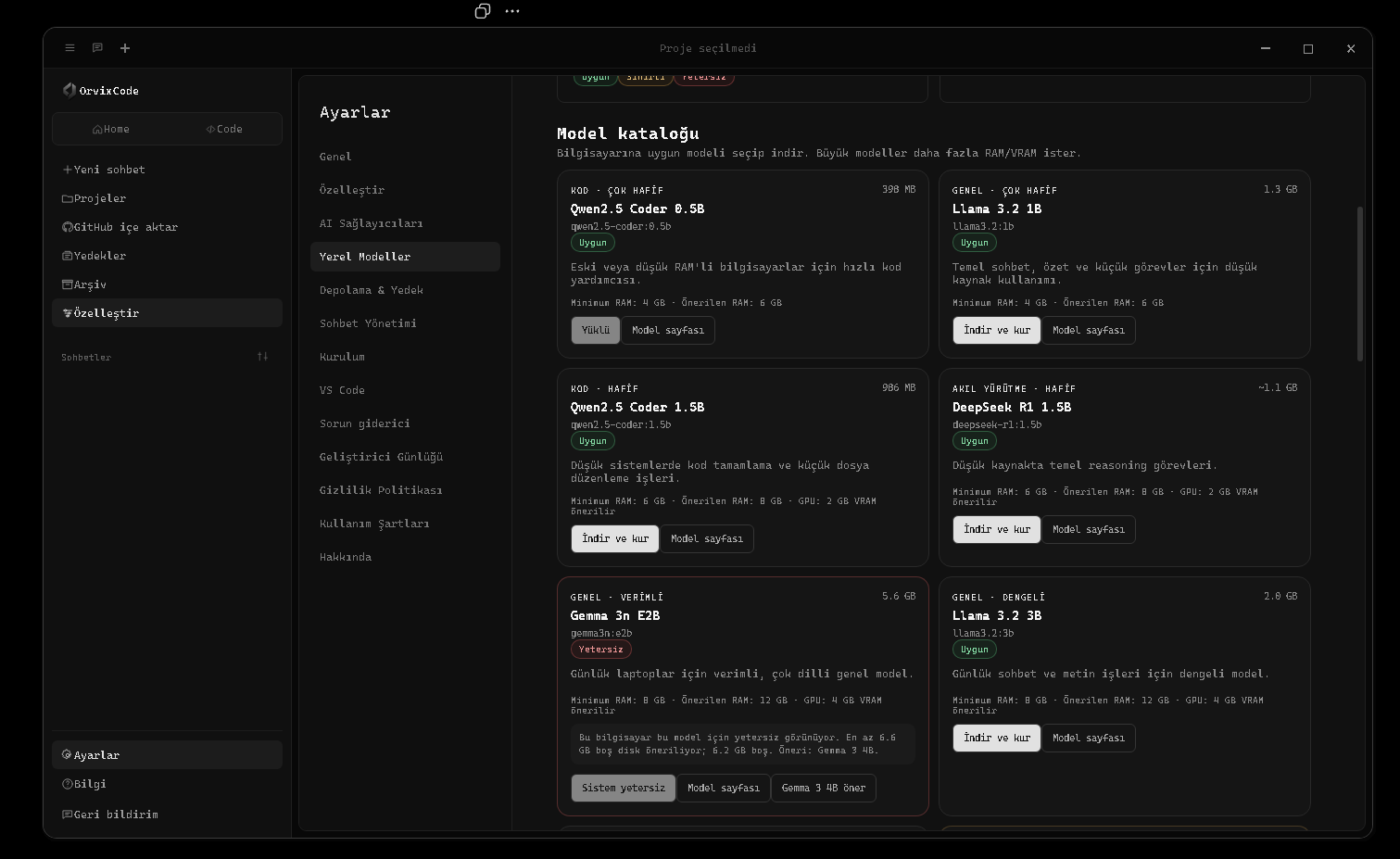
OrvixCode can run supported models locally through Ollama. Local model requests are sent to the Ollama service on your computer and do not require a separate cloud AI API key.
Installed models can appear under Local / Ollama in the model selector and can be used in compatible Ask, Edit, Agent, and Combo workflows.
Third-party licensesLocal models are published by their respective providers. Review each model's current license and usage terms before deployment.
Choosing a model
Use smaller coding models for limited-memory systems and larger models when you need more reasoning capacity and your hardware can support the memory requirements.
What you will learn 01Viona · 로컬 모델
What you will learn 02Local AI · 실습 랩
What you will learn 03진행률 · Diff · Test · Review
실습 랩
Use the lesson in a real OrvixCode workspace instead of only reading it.
1Open a small real project and identify where this lesson applies.
2Ask OrvixCode to explain the current state before making changes.
3Apply one controlled change and verify it with the project’s real checks.
Apply the “로컬 모델” concept to this project. Inspect and explain the current state first. Do not touch unrelated files. Make the smallest safe change, run the relevant build/test/terminal verification, and summarize the real result.
21 Ollama 및 로컬 모델 설정Ollama 및 로컬 모델 설정 — OrvixCode의 기술 사용법, 구성 및 워크플로 안내입니다.
Ollama 및 로컬 모델 설정 — OrvixCode의 기술 사용법, 구성 및 워크플로 안내입니다.
The local model center is available under Settings → Local Models. It manages the Ollama runtime, hardware checks, free disk space, installed models, and troubleshooting tools.
- Open Local ModelsCheck whether the Ollama runtime is available.
- Prepare OllamaIf it is not installed, use the supported setup flow and verify the local service.
- Check compatibilityReview RAM, VRAM, and free-disk recommendations before downloading.
- Download a modelUse pause, resume, or cancel controls while the model is being downloaded.
- Select the modelAfter installation it should appear in the main model selector.
Local model tools
- Start the Ollama service
- Retry GPU mode after a safe CPU fallback
- Open runtime logs
- Open the model storage folder
- Run compatibility checks
What you will learn 01Viona · Ollama 및 로컬 모델 설정
What you will learn 02Local AI · 실습 랩
What you will learn 03진행률 · Diff · Test · Review
실습 랩
Use the lesson in a real OrvixCode workspace instead of only reading it.
1Open a small real project and identify where this lesson applies.
2Ask OrvixCode to explain the current state before making changes.
3Apply one controlled change and verify it with the project’s real checks.
Apply the “Ollama 및 로컬 모델 설정” concept to this project. Inspect and explain the current state first. Do not touch unrelated files. Make the smallest safe change, run the relevant build/test/terminal verification, and summarize the real result.
22 AI 제공업체AI 제공업체 — OrvixCode의 기술 사용법, 구성 및 워크플로 안내입니다.
AI 제공업체 — OrvixCode의 기술 사용법, 구성 및 워크플로 안내입니다.
OrvixCode can centralize Viona and supported external AI providers in one provider screen. The model list can be refreshed based on the models available to your account or API access.
| Provider | Typical use |
|---|---|
| Viona | Primary OrvixCode model workflow |
| OpenAI / ChatGPT | GPT and coding-capable models |
| Google Gemini | Gemini models |
| Anthropic / Claude | Claude models |
| Groq, Mistral, DeepSeek, xAI and others | Additional cloud model options where configured |
| Microsoft Copilot | Supported Microsoft integration when account access is available |
Provider availabilityExact model names, preview status, and account requirements can change independently of the OrvixCode UI.
What you will learn 01Viona · AI 제공업체
What you will learn 02Local AI · 실습 랩
What you will learn 03진행률 · Diff · Test · Review
실습 랩
Use the lesson in a real OrvixCode workspace instead of only reading it.
1Open a small real project and identify where this lesson applies.
2Ask OrvixCode to explain the current state before making changes.
3Apply one controlled change and verify it with the project’s real checks.
Apply the “AI 제공업체” concept to this project. Inspect and explain the current state first. Do not touch unrelated files. Make the smallest safe change, run the relevant build/test/terminal verification, and summarize the real result.
23 Combo 모드Combo 모드 — OrvixCode의 기술 사용법, 구성 및 워크플로 안내입니다.
Combo 모드 — OrvixCode의 기술 사용법, 구성 및 워크플로 안내입니다.
Combo mode lets you assign different models to different stages of a coding task. For example, one model can plan, another can write code, and a third can review the result.
1. PlanAnalyze the request and project context.
2. BuildGenerate the implementation.
3. ReviewCheck for mistakes and regressions.
4. DeliverPrepare the final answer or edit package.
Mix local and cloudCompatible local Ollama models and cloud providers can be assigned to different roles when enabled.
Default stateCombo Mode is off by default. Toggle it from the + quick menu in the message composer.
What you will learn 01Viona · Combo 모드
What you will learn 02Local AI · 실습 랩
What you will learn 03진행률 · Diff · Test · Review
실습 랩
Use the lesson in a real OrvixCode workspace instead of only reading it.
1Open a small real project and identify where this lesson applies.
2Ask OrvixCode to explain the current state before making changes.
3Apply one controlled change and verify it with the project’s real checks.
Apply the “Combo 모드” concept to this project. Inspect and explain the current state first. Do not touch unrelated files. Make the smallest safe change, run the relevant build/test/terminal verification, and summarize the real result.
24 스마트 적응형 컨텍스트스마트 적응형 컨텍스트 — OrvixCode의 기술 사용법, 구성 및 워크플로 안내입니다.
스마트 적응형 컨텍스트 — OrvixCode의 기술 사용법, 구성 및 워크플로 안내입니다.
OrvixCode prepares context according to the task instead of sending every project file on every request. Selected code, the active file, relevant project files, and chat history can be prioritized differently.
Adaptive context
When a request is too large for a model or local memory budget, OrvixCode can reduce context and retry with a smaller working set.
Selected code winsFor very large files, selecting the exact region you want to discuss gives the context system a strong signal about what should be prioritized.
What you will learn 01Viona · 스마트 적응형 컨텍스트
What you will learn 02Local AI · 실습 랩
What you will learn 03진행률 · Diff · Test · Review
실습 랩
Use the lesson in a real OrvixCode workspace instead of only reading it.
1Open a small real project and identify where this lesson applies.
2Ask OrvixCode to explain the current state before making changes.
3Apply one controlled change and verify it with the project’s real checks.
Apply the “스마트 적응형 컨텍스트” concept to this project. Inspect and explain the current state first. Do not touch unrelated files. Make the smallest safe change, run the relevant build/test/terminal verification, and summarize the real result.
25 긴 코드와 대규모 프로젝트 생성긴 코드와 대규모 프로젝트 생성 — OrvixCode의 기술 사용법, 구성 및 워크플로 안내입니다.
긴 코드와 대규모 프로젝트 생성 — OrvixCode의 기술 사용법, 구성 및 워크플로 안내입니다.
OrvixCode detects requests that clearly require large output even when the prompt is short. This is not limited to Python; long-code tasks are supported across HTML/CSS/JavaScript/TypeScript, Go, Rust, PHP, Ruby, Java/Kotlin, C/C++/C#, Swift, Dart, Lua, Scala, Elixir, F#, Solidity, Bash, PowerShell, SQL, and more.
Long output and continuation
- Local models can use a larger output budget when appropriate.
- If a response is cut by a token/context limit, OrvixCode can request continuation from the missing point.
- Repeated overlap is cleaned when continuation chunks are merged.
- Content from an unfinished fenced code block can still be preserved as code.
Large-project planning
- The request is analyzed and a project structure is planned.
- A manifest/file plan is created.
- Files are generated while dependencies and contracts are tracked.
- If imports reveal a missing local module, the plan can be expanded.
- Generation continues when output limits are reached.
- Basic consistency checks run at the end.
Chat stays visibleGenerated code remains in chat; OrvixCode does not automatically switch to the Code page when generation finishes. Use Open in Code manually when you want to move it into the editor.
Model capacityOrvixCode manages planning and continuation, but code quality and usable context still depend on the selected model and hardware.
What you will learn 01Viona · 긴 코드와 대규모 프로젝트 생성
What you will learn 02Local AI · 실습 랩
What you will learn 03진행률 · Diff · Test · Review
실습 랩
Use the lesson in a real OrvixCode workspace instead of only reading it.
1Open a small real project and identify where this lesson applies.
2Ask OrvixCode to explain the current state before making changes.
3Apply one controlled change and verify it with the project’s real checks.
Apply the “긴 코드와 대규모 프로젝트 생성” concept to this project. Inspect and explain the current state first. Do not touch unrelated files. Make the smallest safe change, run the relevant build/test/terminal verification, and summarize the real result.
Track checkpoint · 04 · Models & Context
Before moving on, complete these tasks without relying on guesswork.
- Explain the key ideas of this path in your own words.
- Complete one real task using the workflow from this path.
- Verify your result with evidence such as a diff, test, build or terminal output.
Level · 고급
05 · Project Productivity
Work with GitHub, backups, sessions, settings and keyboard workflows on real repositories.
GitHubBackupSessionsWorkflow
26 GitHub 통합GitHub 통합 — OrvixCode의 기술 사용법, 구성 및 워크플로 안내입니다.
GitHub 통합 — OrvixCode의 기술 사용법, 구성 및 워크플로 안내입니다.
Use the GitHub import flow to bring a repository into a local OrvixCode workspace. After the clone/import completes, the project behaves like a normal local folder and can participate in AI context.
What you will learn 01GitHub · GitHub 통합
What you will learn 02Backup · 실습 랩
What you will learn 03진행률 · Diff · Test · Review
실습 랩
Use the lesson in a real OrvixCode workspace instead of only reading it.
1Open a small real project and identify where this lesson applies.
2Ask OrvixCode to explain the current state before making changes.
3Apply one controlled change and verify it with the project’s real checks.
Apply the “GitHub 통합” concept to this project. Inspect and explain the current state first. Do not touch unrelated files. Make the smallest safe change, run the relevant build/test/terminal verification, and summarize the real result.
27 백업백업 — OrvixCode의 기술 사용법, 구성 및 워크플로 안내입니다.
백업 — OrvixCode의 기술 사용법, 구성 및 워크플로 안내입니다.
OrvixCode can keep backup information around file edits to reduce the risk of data loss. Depending on the edit workflow, earlier content can be retained so changes can be reviewed or reverted.
The VS Code integration also provides an undo flow for supported recent AI changes.
What you will learn 01GitHub · 백업
What you will learn 02Backup · 실습 랩
What you will learn 03진행률 · Diff · Test · Review
실습 랩
Use the lesson in a real OrvixCode workspace instead of only reading it.
1Open a small real project and identify where this lesson applies.
2Ask OrvixCode to explain the current state before making changes.
3Apply one controlled change and verify it with the project’s real checks.
Apply the “백업” concept to this project. Inspect and explain the current state first. Do not touch unrelated files. Make the smallest safe change, run the relevant build/test/terminal verification, and summarize the real result.
28 채팅과 세션채팅과 세션 — OrvixCode의 기술 사용법, 구성 및 워크플로 안내입니다.
채팅과 세션 — OrvixCode의 기술 사용법, 구성 및 워크플로 안내입니다.
Open tabs and saved chats are separate concepts. Closing a tab does not have to delete its conversation history.
- Reopen saved chats from the navigation area.
- Delete chats from the relevant management controls.
- Keep multiple chat tabs open at once.
- Synced VS Code sessions can appear under their own titles.
What you will learn 01GitHub · 채팅과 세션
What you will learn 02Backup · 실습 랩
What you will learn 03진행률 · Diff · Test · Review
실습 랩
Use the lesson in a real OrvixCode workspace instead of only reading it.
1Open a small real project and identify where this lesson applies.
2Ask OrvixCode to explain the current state before making changes.
3Apply one controlled change and verify it with the project’s real checks.
Apply the “채팅과 세션” concept to this project. Inspect and explain the current state first. Do not touch unrelated files. Make the smallest safe change, run the relevant build/test/terminal verification, and summarize the real result.
29 설정설정 — OrvixCode의 기술 사용법, 구성 및 워크플로 안내입니다.
설정 — OrvixCode의 기술 사용법, 구성 및 워크플로 안내입니다.
The settings area groups the main OrvixCode preferences:
- General: default model, creativity, writing animation, sounds, navigation, and language.
- Customize: theme, font family, and text appearance.
- AI Providers: provider connections, model refresh, and Combo configuration.
- Local Models: Ollama service, compatibility, downloads, and logs.
- Storage & Backup: data location and automatic file backup behavior.
- Chat Management: review and remove stored conversations.
- Setup / VS Code: desktop and extension integration options.
- Troubleshooter: local system and connection checks.
- Keyboard Shortcuts: Rebind actions such as send, new chat/project, save, undo/redo, run, terminal, stop AI response, Combo, and main navigation.
What you will learn 01GitHub · 설정
What you will learn 02Backup · 실습 랩
What you will learn 03진행률 · Diff · Test · Review
실습 랩
Use the lesson in a real OrvixCode workspace instead of only reading it.
1Open a small real project and identify where this lesson applies.
2Ask OrvixCode to explain the current state before making changes.
3Apply one controlled change and verify it with the project’s real checks.
Apply the “설정” concept to this project. Inspect and explain the current state first. Do not touch unrelated files. Make the smallest safe change, run the relevant build/test/terminal verification, and summarize the real result.
30 키보드 단축키키보드 단축키 — OrvixCode의 기술 사용법, 구성 및 워크플로 안내입니다.
키보드 단축키 — OrvixCode의 기술 사용법, 구성 및 워크플로 안내입니다.
Open Settings → Keyboard Shortcuts to rebind major application actions. Selecting an action opens a key-capture dialog for the new combination.
Examples of configurable actions
- Send message / new line
- Focus the message box
- New chat and new project
- Attach file and save
- Ctrl+Z undo / Ctrl+Y redo
- Run code and open terminal
- Stop AI response
- Toggle Combo Mode
- Docs, feedback, and main navigation
- Minimize, maximize, close, or send the app to background/tray
ConflictsIf a combination is already assigned to another action, OrvixCode detects the conflict and warns you.
What you will learn 01GitHub · 키보드 단축키
What you will learn 02Backup · 실습 랩
What you will learn 03진행률 · Diff · Test · Review
실습 랩
Use the lesson in a real OrvixCode workspace instead of only reading it.
1Open a small real project and identify where this lesson applies.
2Ask OrvixCode to explain the current state before making changes.
3Apply one controlled change and verify it with the project’s real checks.
Apply the “키보드 단축키” concept to this project. Inspect and explain the current state first. Do not touch unrelated files. Make the smallest safe change, run the relevant build/test/terminal verification, and summarize the real result.
Track checkpoint · 05 · Project Productivity
Before moving on, complete these tasks without relying on guesswork.
- Explain the key ideas of this path in your own words.
- Complete one real task using the workflow from this path.
- Verify your result with evidence such as a diff, test, build or terminal output.
Level · 전문가
06 · Security & Control
Protect API keys, permissions and repository boundaries while keeping AI productive.
SecuritySecretsPermissions
31 테마, 글꼴 및 모양테마, 글꼴 및 모양 — OrvixCode의 기술 사용법, 구성 및 워크플로 안내입니다.
테마, 글꼴 및 모양 — OrvixCode의 기술 사용법, 구성 및 워크플로 안내입니다.
Open Settings → Customize to change OrvixCode's visual appearance.
| Setting | Examples |
|---|---|
| Theme | Orvix Dark, Light, Midnight, Graphite, Forest, and other supported themes |
| Font | Inter, Segoe UI, Arial, Georgia, Cascadia Code |
| Text color | Customize interface text using the available color control |
| Reset | Restore OrvixCode appearance defaults |
Appearance onlyChanging theme or font does not change your AI providers, projects, or chat configuration.
What you will learn 01Security · 테마, 글꼴 및 모양
What you will learn 02Secrets · 실습 랩
What you will learn 03진행률 · Diff · Test · Review
실습 랩
Use the lesson in a real OrvixCode workspace instead of only reading it.
1Open a small real project and identify where this lesson applies.
2Ask OrvixCode to explain the current state before making changes.
3Apply one controlled change and verify it with the project’s real checks.
Apply the “테마, 글꼴 및 모양” concept to this project. Inspect and explain the current state first. Do not touch unrelated files. Make the smallest safe change, run the relevant build/test/terminal verification, and summarize the real result.
32 파일 안전파일 안전 — OrvixCode의 기술 사용법, 구성 및 워크플로 안내입니다.
파일 안전 — OrvixCode의 기술 사용법, 구성 및 워크플로 안내입니다.
OrvixCode aims to keep AI-driven file operations visible and reviewable. The edited file and change state can be shown in the chat or edit report.
When automatic apply is disabled, a prepared edit can wait for user approval before being written.
What you will learn 01Security · 파일 안전
What you will learn 02Secrets · 실습 랩
What you will learn 03진행률 · Diff · Test · Review
실습 랩
Use the lesson in a real OrvixCode workspace instead of only reading it.
1Open a small real project and identify where this lesson applies.
2Ask OrvixCode to explain the current state before making changes.
3Apply one controlled change and verify it with the project’s real checks.
Apply the “파일 안전” concept to this project. Inspect and explain the current state first. Do not touch unrelated files. Make the smallest safe change, run the relevant build/test/terminal verification, and summarize the real result.
33 API 키API 키 — OrvixCode의 기술 사용법, 구성 및 워크플로 안내입니다.
API 키 — OrvixCode의 기술 사용법, 구성 및 워크플로 안내입니다.
External AI providers require the credentials issued by the relevant service.
Do not expose API keysNever place API keys in source code, public repositories, screenshots, or public web pages.
The VS Code extension is designed to use the provider configuration exposed through OrvixCode's connection layer rather than asking you to copy secrets into every editor workflow.
What you will learn 01Security · API 키
What you will learn 02Secrets · 실습 랩
What you will learn 03진행률 · Diff · Test · Review
실습 랩
Use the lesson in a real OrvixCode workspace instead of only reading it.
1Open a small real project and identify where this lesson applies.
2Ask OrvixCode to explain the current state before making changes.
3Apply one controlled change and verify it with the project’s real checks.
Apply the “API 키” concept to this project. Inspect and explain the current state first. Do not touch unrelated files. Make the smallest safe change, run the relevant build/test/terminal verification, and summarize the real result.
34 파일 권한파일 권한 — OrvixCode의 기술 사용법, 구성 및 워크플로 안내입니다.
파일 권한 — OrvixCode의 기술 사용법, 구성 및 워크플로 안내입니다.
Multi-file tasks can have a wider change scope than a single-file edit. Depending on your version and settings, OrvixCode can request permission for one file or for a broader proposed change.
Agent permissionsBefore approving a multi-file operation, review the task scope and the files that are expected to change.
What you will learn 01Security · 파일 권한
What you will learn 02Secrets · 실습 랩
What you will learn 03진행률 · Diff · Test · Review
실습 랩
Use the lesson in a real OrvixCode workspace instead of only reading it.
1Open a small real project and identify where this lesson applies.
2Ask OrvixCode to explain the current state before making changes.
3Apply one controlled change and verify it with the project’s real checks.
Apply the “파일 권한” concept to this project. Inspect and explain the current state first. Do not touch unrelated files. Make the smallest safe change, run the relevant build/test/terminal verification, and summarize the real result.
Track checkpoint · 06 · Security & Control
Before moving on, complete these tasks without relying on guesswork.
- Explain the key ideas of this path in your own words.
- Complete one real task using the workflow from this path.
- Verify your result with evidence such as a diff, test, build or terminal output.
Level · 전문가
07 · Troubleshooting
Diagnose provider, VS Code, local-model and application failures using evidence instead of guesses.
DebuggingRecoveryDiagnostics
35 일반 문제 해결일반 문제 해결 — OrvixCode의 기술 사용법, 구성 및 워크플로 안내입니다.
일반 문제 해결 — OrvixCode의 기술 사용법, 구성 및 워크플로 안내입니다.
AI is not responding
- Confirm that an active model is selected and available.
- For cloud models, verify provider credentials and internet access.
- For local models, confirm that the Ollama service is running.
- In VS Code, use the connection test and review any error details.
File changes are not applying
- Check the edit package state.
- If Auto Apply is enabled, the change may already be applied.
- Verify write permissions and VS Code Workspace Trust.
- Review the diff and retry the edit if needed.
What you will learn 01Debugging · 일반 문제 해결
What you will learn 02Recovery · 실습 랩
What you will learn 03진행률 · Diff · Test · Review
실습 랩
Use the lesson in a real OrvixCode workspace instead of only reading it.
1Open a small real project and identify where this lesson applies.
2Ask OrvixCode to explain the current state before making changes.
3Apply one controlled change and verify it with the project’s real checks.
Apply the “일반 문제 해결” concept to this project. Inspect and explain the current state first. Do not touch unrelated files. Make the smallest safe change, run the relevant build/test/terminal verification, and summarize the real result.
36 Viona 요청 크기 제한Viona 요청 크기 제한 — OrvixCode의 기술 사용법, 구성 및 워크플로 안내입니다.
Viona 요청 크기 제한 — OrvixCode의 기술 사용법, 구성 및 워크플로 안내입니다.
This error can appear when the active file, project context, and chat history together exceed the model request limit.
OrvixCode can reduce the context size and retry with a smaller context profile after an oversized request.
Best resultIn very large files, select the exact code region you want to change. Selected code receives higher context priority.
What you will learn 01Debugging · Viona 요청 크기 제한
What you will learn 02Recovery · 실습 랩
What you will learn 03진행률 · Diff · Test · Review
실습 랩
Use the lesson in a real OrvixCode workspace instead of only reading it.
1Open a small real project and identify where this lesson applies.
2Ask OrvixCode to explain the current state before making changes.
3Apply one controlled change and verify it with the project’s real checks.
Apply the “Viona 요청 크기 제한” concept to this project. Inspect and explain the current state first. Do not touch unrelated files. Make the smallest safe change, run the relevant build/test/terminal verification, and summarize the real result.
37 VS Code 문제 해결VS Code 문제 해결 — OrvixCode의 기술 사용법, 구성 및 워크플로 안내입니다.
VS Code 문제 해결 — OrvixCode의 기술 사용법, 구성 및 워크플로 안내입니다.
Extension is missing from search
Refresh the Extensions view, verify internet access, and search for OrvixCode again. Newly published updates can take time to propagate.
Workspace is not trusted
File-editing features may be restricted until the workspace is trusted in VS Code.
Panel opens but AI does not respond
Run the connection test, then check cloud-provider access or the local OrvixCode/Ollama status.
Simple chat includes irrelevant project context
Update the extension and reload VS Code. Current builds are designed to isolate simple greetings from project context.
Context-menu command does not start
Confirm that code is selected, retry the command, and use a new OrvixCode chat if the issue persists.
What you will learn 01Debugging · VS Code 문제 해결
What you will learn 02Recovery · 실습 랩
What you will learn 03진행률 · Diff · Test · Review
실습 랩
Use the lesson in a real OrvixCode workspace instead of only reading it.
1Open a small real project and identify where this lesson applies.
2Ask OrvixCode to explain the current state before making changes.
3Apply one controlled change and verify it with the project’s real checks.
Apply the “VS Code 문제 해결” concept to this project. Inspect and explain the current state first. Do not touch unrelated files. Make the smallest safe change, run the relevant build/test/terminal verification, and summarize the real result.
38 로컬 모델 문제 해결로컬 모델 문제 해결 — OrvixCode의 기술 사용법, 구성 및 워크플로 안내입니다.
로컬 모델 문제 해결 — OrvixCode의 기술 사용법, 구성 및 워크플로 안내입니다.
Ollama is not running
Open Settings → Local Models, check the runtime state, and use the service start control. Review logs if startup continues to fail.
“failed to allocate buffer / kv cache”
The selected model or context length may be too large for available RAM/VRAM. OrvixCode can retry with smaller context levels.
8192 → 6144 → 4096 → 3072 → 2048
CUDA / GPU error
A safe CPU fallback can keep the model usable. You can retry GPU mode later from the local model controls.
Local model is too slow
Try a smaller model, close memory-heavy applications, and confirm that compatible GPU acceleration is active.
What you will learn 01Debugging · 로컬 모델 문제 해결
What you will learn 02Recovery · 실습 랩
What you will learn 03진행률 · Diff · Test · Review
실습 랩
Use the lesson in a real OrvixCode workspace instead of only reading it.
1Open a small real project and identify where this lesson applies.
2Ask OrvixCode to explain the current state before making changes.
3Apply one controlled change and verify it with the project’s real checks.
Apply the “로컬 모델 문제 해결” concept to this project. Inspect and explain the current state first. Do not touch unrelated files. Make the smallest safe change, run the relevant build/test/terminal verification, and summarize the real result.
39 FAQFAQ — OrvixCode의 기술 사용법, 구성 및 워크플로 안내입니다.
FAQ — OrvixCode의 기술 사용법, 구성 및 워크플로 안내입니다.
Yes, selected features can work offline when you use a previously downloaded local Ollama model. Cloud providers and new model downloads still need internet access.
No. OrvixCode has its own desktop interface; the VS Code extension is optional.
Yes. A clear change request can produce an applicable edit package.
Agent mode is designed for tasks that span several files.
No. Models running through local Ollama do not require a separate cloud AI API key.
Yes. Long-output requests can use larger output budgets and continuation handling when the selected model supports it.
This package was updated on September 1, 2026 for the OrvixCode 1.2.0 feature set.
What you will learn 01Debugging · FAQ
What you will learn 02Recovery · 실습 랩
What you will learn 03진행률 · Diff · Test · Review
실습 랩
Use the lesson in a real OrvixCode workspace instead of only reading it.
1Open a small real project and identify where this lesson applies.
2Ask OrvixCode to explain the current state before making changes.
3Apply one controlled change and verify it with the project’s real checks.
Apply the “FAQ” concept to this project. Inspect and explain the current state first. Do not touch unrelated files. Make the smallest safe change, run the relevant build/test/terminal verification, and summarize the real result.
Track checkpoint · 07 · Troubleshooting
Before moving on, complete these tasks without relying on guesswork.
- Explain the key ideas of this path in your own words.
- Complete one real task using the workflow from this path.
- Verify your result with evidence such as a diff, test, build or terminal output.
Level · 고급
08 · Platform & Release Operations
Understand Learn, service status, releases and how the OrvixCode platform communicates changes.
LearnStatusReleases
40 OrvixCode 학습 센터OrvixCode Learn에서 Ask, Edit, Agent, 프로젝트 컨텍스트, 터미널, 로컬 모델 및 안전한 개발 흐름을 학습합니다.
OrvixCode Learn에서 Ask, Edit, Agent, 프로젝트 컨텍스트, 터미널, 로컬 모델 및 안전한 개발 흐름을 학습합니다.
OrvixCode Learn은 참조 문서를 보완하는 단계별 실습 학습 공간이며 영상 없이 바로 읽고 적용할 수 있습니다.
OrvixCode LearnOrvixCode Learn 열기 →
What you will learn 01Learn · OrvixCode 학습 센터
What you will learn 02Status · 실습 랩
What you will learn 03진행률 · Diff · Test · Review
실습 랩
Use the lesson in a real OrvixCode workspace instead of only reading it.
1Open a small real project and identify where this lesson applies.
2Ask OrvixCode to explain the current state before making changes.
3Apply one controlled change and verify it with the project’s real checks.
Apply the “OrvixCode 학습 센터” concept to this project. Inspect and explain the current state first. Do not touch unrelated files. Make the smallest safe change, run the relevant build/test/terminal verification, and summarize the real result.
41 공지 및 서비스 상태OrvixCode 서비스의 실시간 상태, 유지보수, 업데이트 및 긴급 공지를 확인합니다.
OrvixCode 서비스의 실시간 상태, 유지보수, 업데이트 및 긴급 공지를 확인합니다.
공식 상태 페이지에서 웹사이트, 문서, 다운로드, AI 서비스 상태를 확인할 수 있습니다. 관리자 공지는 공개 페이지와 기계 판독 피드에 즉시 반영됩니다.
What you will learn 01Learn · 공지 및 서비스 상태
What you will learn 02Status · 실습 랩
What you will learn 03진행률 · Diff · Test · Review
실습 랩
Use the lesson in a real OrvixCode workspace instead of only reading it.
1Open a small real project and identify where this lesson applies.
2Ask OrvixCode to explain the current state before making changes.
3Apply one controlled change and verify it with the project’s real checks.
Apply the “공지 및 서비스 상태” concept to this project. Inspect and explain the current state first. Do not touch unrelated files. Make the smallest safe change, run the relevant build/test/terminal verification, and summarize the real result.
42 버전 및 최신 다운로드Microsoft Store에서 최신 안정 OrvixCode 버전을 설치하세요.
Microsoft Store에서 최신 안정 OrvixCode 버전을 설치하세요.
사이트의 다운로드 링크는 중앙 릴리스 설정을 사용합니다. 관리자가 새 안정 버전을 게시하면 버전 표시와 다운로드 대상이 전체 플랫폼에서 갱신됩니다.
https://orvixcode.orvixgames.com/download.php?lang=ko-kr
What you will learn 01Learn · 버전 및 최신 다운로드
What you will learn 02Status · 실습 랩
What you will learn 03진행률 · Diff · Test · Review
실습 랩
Use the lesson in a real OrvixCode workspace instead of only reading it.
1Open a small real project and identify where this lesson applies.
2Ask OrvixCode to explain the current state before making changes.
3Apply one controlled change and verify it with the project’s real checks.
Apply the “버전 및 최신 다운로드” concept to this project. Inspect and explain the current state first. Do not touch unrelated files. Make the smallest safe change, run the relevant build/test/terminal verification, and summarize the real result.
Track checkpoint · 08 · Platform & Release Operations
Before moving on, complete these tasks without relying on guesswork.
- Explain the key ideas of this path in your own words.
- Complete one real task using the workflow from this path.
- Verify your result with evidence such as a diff, test, build or terminal output.
CAPSTONE
최종 프로젝트
Finish the academy with larger projects that combine multiple OrvixCode skills.
Project 1
Build a real product from zero
Objective: Use OrvixCode Agent to build a small real web product and finish it with a verification loop.
- Turn requirements into a plan first.
- Implement at least three user-facing features.
- Verify responsive behavior.
- Run build/tests or browser-console checks.
- Report the final diff and changed files.
Project 2
Bug hunt in an existing repository
Objective: Enter an unfamiliar project, reproduce a bug, make the smallest safe fix and add regression coverage.
- Analyze repository structure first.
- Record a reproducible failure.
- Explain root cause before editing.
- Apply a minimal patch.
- Run the same verification again.
Project 3
Local model and provider resilience
Objective: Exercise local-model, provider fallback and Agent recovery paths with real failure scenarios.
- Create an empty-response scenario.
- Observe provider timeout and fallback.
- Check tool-call compatibility.
- Collect evidence from developer logs.
- Do not accept silent failure.
Project 4
Large-repo refactor and security review
Objective: Plan and execute a multi-file refactor, verify it, then run a separate security and permission review.
- Map affected files first.
- Write down public behavior constraints.
- Work in small patches.
- Run tests/build/typecheck.
- Review secrets, permissions and unrelated file changes.
ORVIXCODE ACADEMY · CERTIFICATE
수료 인증서
Complete every lesson to unlock a printable completion certificate.

ORVIXCODEOrvixCode Academy
아카데미 수료
ORVIXCODE
ACADEMY
COMPLETION
ACADEMY
COMPLETION
ORVIXCODE ACADEMY
수료 인증서
이 인증서는 다음 학습자에게 수여됩니다
—
OrvixCode 아카데미 전체 커리큘럼을 성공적으로 완료하고 AI 지원 소프트웨어 개발 실무 역량을 입증했습니다.
42완료 강의
8학습 경로
14+예상 학습 · 시간
OrvixCode
Orvix Games AI Studio
Academy & Platform
Issued by OrvixCode Academy · orvixcode.orvixgames.com