What you will learn + 實作實驗
ORVIXCODE · FULL LEARNING SYSTEM
OrvixCode 學院
Master OrvixCode from first launch to professional repository workflows. Learn by reading, practicing, testing and finishing real projects.
42課程
8學習路徑
14+小時
0已完成
Academy Dashboard
0%Progress is stored locally in your browser. No account is required. Tip: press Ctrl/⌘ + K to search.
Overview
Inside this academy
Learn by doing
Follow the full curriculum or focus on the skill area you need today.
Use the lesson in a real OrvixCode workspace instead of only reading it.
Progress is stored locally in your browser. No account is required.
Finish the academy with larger projects that combine multiple OrvixCode skills.
Desktop · Mobile · RTL · Search · Local progress
Skill map
Choose a learning path
Follow the full curriculum or focus on the skill area you need today.
入門 · 7 課程
01 · Foundations
Install OrvixCode, understand the interface and build a reliable first-project workflow.
中級 · 6 課程
02 · AI Coding Workflow
Use Ask, Edit, Agent, the editor, terminal and undo flow without losing control of changes.
中級 · 5 課程
03 · VS Code Integration
Bring OrvixCode into VS Code and learn selection, context, Agent and synchronization workflows.
進階 · 7 課程
04 · Models & Context
Choose Viona, cloud providers, local models and Combo intelligently; manage context and long code.
進階 · 5 課程
05 · Project Productivity
Work with GitHub, backups, sessions, settings and keyboard workflows on real repositories.
專家 · 4 課程
06 · Security & Control
Protect API keys, permissions and repository boundaries while keeping AI productive.
專家 · 5 課程
07 · Troubleshooting
Diagnose provider, VS Code, local-model and application failures using evidence instead of guesses.
進階 · 3 課程
08 · Platform & Release Operations
Understand Learn, service status, releases and how the OrvixCode platform communicates changes.
沒有符合的課程。
Level · 入門
01 · Foundations
Install OrvixCode, understand the interface and build a reliable first-project workflow.
WorkspaceProjectsChat
1 概觀概觀 — OrvixCode 的技術使用方式、設定與工作流程說明。
概觀 — OrvixCode 的技術使用方式、設定與工作流程說明。
OrvixCode 是一款 Windows 桌面开发环境,把 AI 聊天与真实项目、文件、编辑器工作流和内置终端连接起来。
您可以打开或创建项目,使用 AI 分析和编辑代码,执行多文件项目任务,并在受支持的本地或在线模型之间选择。
核心能力
- 针对长代码和大型项目任务的规划与自动续写。
- 多文件项目生成以及基于依赖关系的文件清单验证。
- 语法高亮代码编辑器、问题面板、AI 修复与行内 AI 编辑。
- 内置终端以及 AI 辅助分析终端错误。
- 使用同一 Python 解释器自动安装缺失包并重试。
- 解释、编辑和修复选中代码。
- 可自定义键盘快捷键、停止回复以及流式 Markdown 格式化。
- Ollama 本地模型、在线提供商、Combo Mode 与 Visual Studio Code 集成。
控制权仍在您手中AI 文件修改保留预览、权限、应用、备份与撤销流程。
What you will learn 01Workspace · 概觀
What you will learn 02Projects · 實作實驗
What you will learn 03進度 · Diff · Test · Review
實作實驗
Use the lesson in a real OrvixCode workspace instead of only reading it.
1Open a small real project and identify where this lesson applies.
2Ask OrvixCode to explain the current state before making changes.
3Apply one controlled change and verify it with the project’s real checks.
Apply the “概觀” concept to this project. Inspect and explain the current state first. Do not touch unrelated files. Make the smallest safe change, run the relevant build/test/terminal verification, and summarize the real result.
2 系統需求系統需求 — OrvixCode 的技術使用方式、設定與工作流程說明。
系統需求 — OrvixCode 的技術使用方式、設定與工作流程說明。
| 组件 | 要求 / 建议 |
|---|---|
| 操作系统 | Windows 10 或 Windows 11 |
| 架构 | 64 位 |
| 网络 | 云端 AI 提供商和下载本地模型需要网络。已经下载到 Ollama 的模型可在本地离线运行。 |
| RAM | 桌面应用的需求取决于项目。运行本地 AI 时,根据模型大小可能需要约 4 GB 起步,甚至远高于此;OrvixCode 会在模型卡片中显示兼容性提示。 |
| GPU / VRAM | 本地模型并不强制要求 GPU,但兼容的 GPU/VRAM 可显著提升速度。检测到 GPU/驱动问题时,可尝试安全的 CPU 回退。 |
| 磁盘 | 需要足够空间存放应用、项目/备份以及下载的本地模型。目录中的模型大小可能从几百 MB 到数百 GB。 |
| VS Code | 仅在使用 Visual Studio Code 集成时需要。 |
本地 AI 注意事项本地模型的质量和速度取决于模型大小、RAM、VRAM、GPU、剩余磁盘空间以及 context 大小。内存较低的电脑可能无法运行超大模型。
What you will learn 01Workspace · 系統需求
What you will learn 02Projects · 實作實驗
What you will learn 03進度 · Diff · Test · Review
實作實驗
Use the lesson in a real OrvixCode workspace instead of only reading it.
1Open a small real project and identify where this lesson applies.
2Ask OrvixCode to explain the current state before making changes.
3Apply one controlled change and verify it with the project’s real checks.
Apply the “系統需求” concept to this project. Inspect and explain the current state first. Do not touch unrelated files. Make the smallest safe change, run the relevant build/test/terminal verification, and summarize the real result.
3 安裝安裝 — OrvixCode 的技術使用方式、設定與工作流程說明。
安裝 — OrvixCode 的技術使用方式、設定與工作流程說明。
请从官方产品页下载 OrvixCode:
https://orvixcode.orvixgames.com/download.php?lang=zh-tw
- 下载安装程序 打开 OrvixCode 产品页并下载当前 Windows 安装包。
- 运行 Setup 如果 Windows 弹出安全提示,请确认文件来源后再继续。
- 选择安装目录 可以使用默认目录,也可以选择其他受支持的位置。
- 选择 VS Code 集成 如果安装程序提供安装/更新 Visual Studio Code 扩展的选项,可以保持启用。
- 完成安装 从桌面快捷方式或开始菜单启动 OrvixCode。
What you will learn 01Workspace · 安裝
What you will learn 02Projects · 實作實驗
What you will learn 03進度 · Diff · Test · Review
實作實驗
Use the lesson in a real OrvixCode workspace instead of only reading it.
1Open a small real project and identify where this lesson applies.
2Ask OrvixCode to explain the current state before making changes.
3Apply one controlled change and verify it with the project’s real checks.
Apply the “安裝” concept to this project. Inspect and explain the current state first. Do not touch unrelated files. Make the smallest safe change, run the relevant build/test/terminal verification, and summarize the real result.
4 首次啟動首次啟動 — OrvixCode 的技術使用方式、設定與工作流程說明。
首次啟動 — OrvixCode 的技術使用方式、設定與工作流程說明。
首次启动时,OrvixCode 可能会显示初始化和基础偏好设置。你可以选择应用语言、工作目录以及基本使用选项。
初始化完成后会进入主工作区。你可以在这里添加项目、创建新对话、配置 AI 提供商或准备本地模型。
What you will learn 01Workspace · 首次啟動
What you will learn 02Projects · 實作實驗
What you will learn 03進度 · Diff · Test · Review
實作實驗
Use the lesson in a real OrvixCode workspace instead of only reading it.
1Open a small real project and identify where this lesson applies.
2Ask OrvixCode to explain the current state before making changes.
3Apply one controlled change and verify it with the project’s real checks.
Apply the “首次啟動” concept to this project. Inspect and explain the current state first. Do not touch unrelated files. Make the smallest safe change, run the relevant build/test/terminal verification, and summarize the real result.
5 介面介面 — OrvixCode 的技術使用方式、設定與工作流程說明。
介面 — OrvixCode 的技術使用方式、設定與工作流程說明。
左侧面板
左侧面板用于快速访问项目、对话、工具和应用主要区域,并可按需折叠。
顶部标签页
标签页可同时保持多个对话或工作区打开。关闭标签页并不等于删除对话历史。
AI 聊天区域
可在这里管理提示词、当前模型和项目上下文。AI 回复中可显示操作摘要、受影响文件以及编辑状态。
What you will learn 01Workspace · 介面
What you will learn 02Projects · 實作實驗
What you will learn 03進度 · Diff · Test · Review
實作實驗
Use the lesson in a real OrvixCode workspace instead of only reading it.
1Open a small real project and identify where this lesson applies.
2Ask OrvixCode to explain the current state before making changes.
3Apply one controlled change and verify it with the project’s real checks.
Apply the “介面” concept to this project. Inspect and explain the current state first. Do not touch unrelated files. Make the smallest safe change, run the relevant build/test/terminal verification, and summarize the real result.
6 專案專案 — OrvixCode 的技術使用方式、設定與工作流程說明。
專案 — OrvixCode 的技術使用方式、設定與工作流程說明。
OrvixCode 项目基于本地文件夹。选择文件夹作为工作区后,AI 可以使用与任务相关的项目上下文。
新建或现有项目
- 通过新建项目创建工作区。
- 可以直接连接现有源码文件夹。
- 可从消息框下方的项目选择器使用 + 新建项目。
AI 任务自动创建项目
当您要求 OrvixCode 生成项目而没有选择真实项目时,它可以创建项目文件夹并加入 Projects。名称重复时会生成 Project 2、Project 3 等唯一名称。
大型项目文件规划
大型任务会按子系统和文件拆分,而不是压缩成少数超大文件。生成过程中会检查 import、依赖和接口关系;发现缺失本地模块时可以扩展 manifest。
上下文范围超大文件夹不会在每次请求中完整发送。OrvixCode 会尽量选择与任务相关的文件和片段。
What you will learn 01Workspace · 專案
What you will learn 02Projects · 實作實驗
What you will learn 03進度 · Diff · Test · Review
實作實驗
Use the lesson in a real OrvixCode workspace instead of only reading it.
1Open a small real project and identify where this lesson applies.
2Ask OrvixCode to explain the current state before making changes.
3Apply one controlled change and verify it with the project’s real checks.
Apply the “專案” concept to this project. Inspect and explain the current state first. Do not touch unrelated files. Make the smallest safe change, run the relevant build/test/terminal verification, and summarize the real result.
7 AI 聊天AI 聊天 — OrvixCode 的技術使用方式、設定與工作流程說明。
AI 聊天 — OrvixCode 的技術使用方式、設定與工作流程說明。
AI 聊天可用于询问项目、分析错误、生成代码、编辑文件或获取架构建议。
附件与选中代码上下文
使用输入框中的 + 菜单添加文件。TXT/代码附件会明确作为可用上下文提供给 AI;选中代码的解释请求也不会被误判为项目生成任务。
停止回复
AI 回复期间,发送按钮会变为 ■ 停止。停止操作会取消续写和大型项目生成步骤,并阻止迟到的输出继续追加。
流式显示
Markdown 与代码块会在回复流式生成时实时格式化,而不是等回复完成后才处理。长用户消息会保留换行和代码块结构。
提示词示例
检查此项目的登录系统。
找出会话刷新期间可能发生的错误。
如有需要,请编辑相关文件并说明你的修改。
What you will learn 01Workspace · AI 聊天
What you will learn 02Projects · 實作實驗
What you will learn 03進度 · Diff · Test · Review
實作實驗
Use the lesson in a real OrvixCode workspace instead of only reading it.
1Open a small real project and identify where this lesson applies.
2Ask OrvixCode to explain the current state before making changes.
3Apply one controlled change and verify it with the project’s real checks.
Apply the “AI 聊天” concept to this project. Inspect and explain the current state first. Do not touch unrelated files. Make the smallest safe change, run the relevant build/test/terminal verification, and summarize the real result.
Track checkpoint · 01 · Foundations
Before moving on, complete these tasks without relying on guesswork.
- Explain the key ideas of this path in your own words.
- Complete one real task using the workflow from this path.
- Verify your result with evidence such as a diff, test, build or terminal output.
Level · 中級
02 · AI Coding Workflow
Use Ask, Edit, Agent, the editor, terminal and undo flow without losing control of changes.
AskEditAgentTerminal
8 Ask / Edit / AgentAsk / Edit / Agent — OrvixCode 的技術使用方式、設定與工作流程說明。
Ask / Edit / Agent — OrvixCode 的技術使用方式、設定與工作流程說明。
Ask
用于提问、获取说明、分析代码,并在明确要求时准备修改。
Edit
直接对当前文件进行集中修改,适合单文件任务。
Agent
适合多文件任务、新文件创建以及项目级修改。
在 Ask 模式中编辑
Ask 不仅用于解释。如果提示词明确要求修改代码,OrvixCode 可以准备可应用的编辑包。
示例“修复这个文件中的错误处理并去掉重复代码。”可以在 Ask 模式中触发“分析 + 编辑”流程。
What you will learn 01Ask · Ask / Edit / Agent
What you will learn 02Edit · 實作實驗
What you will learn 03進度 · Diff · Test · Review
實作實驗
Use the lesson in a real OrvixCode workspace instead of only reading it.
1Open a small real project and identify where this lesson applies.
2Ask OrvixCode to explain the current state before making changes.
3Apply one controlled change and verify it with the project’s real checks.
Apply the “Ask / Edit / Agent” concept to this project. Inspect and explain the current state first. Do not touch unrelated files. Make the smallest safe change, run the relevant build/test/terminal verification, and summarize the real result.
9 檔案編輯檔案編輯 — OrvixCode 的技術使用方式、設定與工作流程說明。
檔案編輯 — OrvixCode 的技術使用方式、設定與工作流程說明。
AI 修改不必只停留在聊天文本中。OrvixCode 可以把结果转换为可应用到项目文件的修改。
1. 请求用户描述需要的修改。
2. 分析AI 检查相关上下文和文件。
3. 编辑包修改被整理成可应用的编辑包。
4. 应用把修改应用到编辑器或磁盘。
创建新文件
在 Agent 等多文件模式下,AI 可以根据任务需要创建新文件。
What you will learn 01Ask · 檔案編輯
What you will learn 02Edit · 實作實驗
What you will learn 03進度 · Diff · Test · Review
實作實驗
Use the lesson in a real OrvixCode workspace instead of only reading it.
1Open a small real project and identify where this lesson applies.
2Ask OrvixCode to explain the current state before making changes.
3Apply one controlled change and verify it with the project’s real checks.
Apply the “檔案編輯” concept to this project. Inspect and explain the current state first. Do not touch unrelated files. Make the smallest safe change, run the relevant build/test/terminal verification, and summarize the real result.
10 程式碼編輯器與 AI 工具程式碼編輯器與 AI 工具 — OrvixCode 的技術使用方式、設定與工作流程說明。
程式碼編輯器與 AI 工具 — OrvixCode 的技術使用方式、設定與工作流程說明。
代码编辑器保留原有编辑区域,并加入语法高亮以及错误/警告层。
语法与问题
- 常见语言的语法高亮。
- 解析/语法错误可显示为红色;警告和部分缺失模块情况显示为黄色。
- 有问题的代码范围可直接在编辑器中用下划线标记。
AI 编辑
- ★ 使用 AI 修复:从问题面板修复当前文件,但不会自动保存。
- 使用 AI 编辑…:只发送选中的文本范围和您的指令,并把返回结果替换回同一范围。
- 让 OrvixCode 解释选中代码:把选中内容作为解释上下文发送。
行内 AI 编辑期间,选中区域可暂时模糊并显示 ★ AI 正在编辑…。AI 编辑也会加入 Ctrl+Z / Ctrl+Y 历史。
保存控制AI 修复与行内编辑可以更新编辑器,但不会自动保存;是否写入磁盘仍由您决定。
What you will learn 01Ask · 程式碼編輯器與 AI 工具
What you will learn 02Edit · 實作實驗
What you will learn 03進度 · Diff · Test · Review
實作實驗
Use the lesson in a real OrvixCode workspace instead of only reading it.
1Open a small real project and identify where this lesson applies.
2Ask OrvixCode to explain the current state before making changes.
3Apply one controlled change and verify it with the project’s real checks.
Apply the “程式碼編輯器與 AI 工具” concept to this project. Inspect and explain the current state first. Do not touch unrelated files. Make the smallest safe change, run the relevant build/test/terminal verification, and summarize the real result.
11 Python 執行與相依套件Python 執行與相依套件 — OrvixCode 的技術使用方式、設定與工作流程說明。
Python 執行與相依套件 — OrvixCode 的技術使用方式、設定與工作流程說明。
运行 Python 文件时,如果存在项目 .venv 或 venv,OrvixCode 会优先使用其中的 Python 解释器。
自动安装缺失包
如果出现 ModuleNotFoundError 且缺失名称不是本地项目模块,OrvixCode 可以用同一解释器尝试 pip 安装,然后重新运行文件。
部分 import 名会映射到包名,例如 cv2 → opencv-python、PIL → Pillow、yaml → PyYAML、sklearn → scikit-learn。
使用 AI 修复
运行失败时,★ 使用 AI 修复可以把错误、当前文件和相关上下文发送给 AI。
安装包自动安装仅针对 Python 包,可能需要网络/pip 访问。本地项目模块不会被当成 pip 包安装。
What you will learn 01Ask · Python 執行與相依套件
What you will learn 02Edit · 實作實驗
What you will learn 03進度 · Diff · Test · Review
實作實驗
Use the lesson in a real OrvixCode workspace instead of only reading it.
1Open a small real project and identify where this lesson applies.
2Ask OrvixCode to explain the current state before making changes.
3Apply one controlled change and verify it with the project’s real checks.
Apply the “Python 執行與相依套件” concept to this project. Inspect and explain the current state first. Do not touch unrelated files. Make the smallest safe change, run the relevant build/test/terminal verification, and summarize the real result.
12 內建終端機內建終端機 — OrvixCode 的技術使用方式、設定與工作流程說明。
內建終端機 — OrvixCode 的技術使用方式、設定與工作流程說明。
内置终端可像普通命令终端一样使用。
cd修改的工作目录会在终端会话中保持。clear/cls可清空输出。- 会话中保存命令历史,可用上/下方向键查看之前的命令。
使用 AI 修复终端错误
命令失败时,★ 使用 AI 修复可以把最后一条命令、错误输出以及相关时的当前文件发送给 AI。
命令控制终端不会自行执行未经用户输入的命令;只运行用户主动输入的命令。
What you will learn 01Ask · 內建終端機
What you will learn 02Edit · 實作實驗
What you will learn 03進度 · Diff · Test · Review
實作實驗
Use the lesson in a real OrvixCode workspace instead of only reading it.
1Open a small real project and identify where this lesson applies.
2Ask OrvixCode to explain the current state before making changes.
3Apply one controlled change and verify it with the project’s real checks.
Apply the “內建終端機” concept to this project. Inspect and explain the current state first. Do not touch unrelated files. Make the smallest safe change, run the relevant build/test/terminal verification, and summarize the real result.
13 Diff / 套用 / 復原Diff / 套用 / 復原 — OrvixCode 的技術使用方式、設定與工作流程說明。
Diff / 套用 / 復原 — OrvixCode 的技術使用方式、設定與工作流程說明。
OrvixCode 会在编辑流程中跟踪文件修改状态。
- Diff / 预览:在应用前或应用后比较改动。
- 应用:把准备好的编辑包写入文件。
- 已应用:已经写入的修改会保持状态,而不会被错误地识别为不存在。
- 撤销:回退最近一次 AI 修改。
编辑包状态如果启用了 Auto Apply,修改可能已经自动应用,此时界面会显示“已应用”。
What you will learn 01Ask · Diff / 套用 / 復原
What you will learn 02Edit · 實作實驗
What you will learn 03進度 · Diff · Test · Review
實作實驗
Use the lesson in a real OrvixCode workspace instead of only reading it.
1Open a small real project and identify where this lesson applies.
2Ask OrvixCode to explain the current state before making changes.
3Apply one controlled change and verify it with the project’s real checks.
Apply the “Diff / 套用 / 復原” concept to this project. Inspect and explain the current state first. Do not touch unrelated files. Make the smallest safe change, run the relevant build/test/terminal verification, and summarize the real result.
Track checkpoint · 02 · AI Coding Workflow
Before moving on, complete these tasks without relying on guesswork.
- Explain the key ideas of this path in your own words.
- Complete one real task using the workflow from this path.
- Verify your result with evidence such as a diff, test, build or terminal output.
Level · 中級
03 · VS Code Integration
Bring OrvixCode into VS Code and learn selection, context, Agent and synchronization workflows.
VS CodeSelectionContext
14 VS Code 整合VS Code 整合 — OrvixCode 的技術使用方式、設定與工作流程說明。
VS Code 整合 — OrvixCode 的技術使用方式、設定與工作流程說明。
OrvixCode 提供 Visual Studio Code 扩展。扩展会在 Activity Bar 中打开 OrvixCode 面板,把云端和本地 AI 能力带入编辑器。
VS Code 中的主要功能
- OrvixCode AI 聊天面板,以及 Ask、Edit、Agent 模式。
- 选择云端模型和本地 Ollama 模型。
- 当前文件和已选代码上下文。
- 对选中代码使用右键命令。
- 经用户确认后应用 AI 文件修改,并支持 Diff / 预览 / 撤销。
- 模型选择、连接状态和错误信息。
- 把 VS Code 对话同步到桌面版 OrvixCode 历史记录。
简单聊天的上下文隔离在 Ask 模式中,像“你好”这样不需要项目上下文的消息不会把当前文件、workspace 或项目内容发送给模型。真正的代码/文件问题以及 Edit、Agent 任务仍会使用必要上下文,并有额外过滤来防止内部 system/edit 指令出现在用户可见回复中。
忽略的依赖目录
.buildenv、site-packages、.tox、.nox、.pytest_cache、.mypy_cache、.ruff_cache 等依赖或缓存目录不会被加入 AI 项目上下文扫描。快速 AI 操作
扩展的快速 AI 操作不再局限于解释和基础修复:
- 解释代码
- 修复错误
- 重构
- 检查项目
- 生成测试
- 代码审查
- 生成文档
- 性能改进建议
找不到桌面应用时扩展可提供打开下载页面、选择 OrvixCode EXE,或稍后再设置的选项。
What you will learn 01VS Code · VS Code 整合
What you will learn 02Selection · 實作實驗
What you will learn 03進度 · Diff · Test · Review
實作實驗
Use the lesson in a real OrvixCode workspace instead of only reading it.
1Open a small real project and identify where this lesson applies.
2Ask OrvixCode to explain the current state before making changes.
3Apply one controlled change and verify it with the project’s real checks.
Apply the “VS Code 整合” concept to this project. Inspect and explain the current state first. Do not touch unrelated files. Make the smallest safe change, run the relevant build/test/terminal verification, and summarize the real result.
15 安裝 VS Code 擴充功能安裝 VS Code 擴充功能 — OrvixCode 的技術使用方式、設定與工作流程說明。
安裝 VS Code 擴充功能 — OrvixCode 的技術使用方式、設定與工作流程說明。
可直接从 Visual Studio Code 的“扩展”页面安装 OrvixCode。普通用户不需要手动安装 VSIX。
- 打开 Visual Studio Code 点击 Activity Bar 的扩展图标,或按 Ctrl+Shift+X。
- 搜索 OrvixCode 在 Marketplace 搜索框输入 OrvixCode。
- 安装扩展 选择发布者为 Orvix Games AI Studio 的 OrvixCode 扩展并点击 Install。
- 打开 OrvixCode 面板 安装完成后点击 Activity Bar 中的 OrvixCode 图标。
- 连接桌面应用 使用 AI 功能前,请确认电脑上已安装 OrvixCode 桌面应用。
安装后如果扩展没有出现,可从命令面板运行
Developer: Reload Window,或完全重启 VS Code。What you will learn 01VS Code · 安裝 VS Code 擴充功能
What you will learn 02Selection · 實作實驗
What you will learn 03進度 · Diff · Test · Review
實作實驗
Use the lesson in a real OrvixCode workspace instead of only reading it.
1Open a small real project and identify where this lesson applies.
2Ask OrvixCode to explain the current state before making changes.
3Apply one controlled change and verify it with the project’s real checks.
Apply the “安裝 VS Code 擴充功能” concept to this project. Inspect and explain the current state first. Do not touch unrelated files. Make the smallest safe change, run the relevant build/test/terminal verification, and summarize the real result.
16 內容功能表命令內容功能表命令 — OrvixCode 的技術使用方式、設定與工作流程說明。
內容功能表命令 — OrvixCode 的技術使用方式、設定與工作流程說明。
在编辑器中选中一段代码并右键,即可使用 OrvixCode 命令。
| 命令 | 作用 |
|---|---|
| 向 AI 询问选中代码 | 把选中的代码连同聊天上下文发送到 OrvixCode 面板。 |
| 解释选中代码 | 说明代码功能、主要流程以及可能的问题。 |
| 修复选中代码 | 针对检测到的问题准备可应用的修改。 |
| 重构 | 在保持行为的同时尽量简化或重新组织代码。 |
命令运行时 OrvixCode 面板会打开并开始请求,处理过程中应显示状态指示。
What you will learn 01VS Code · 內容功能表命令
What you will learn 02Selection · 實作實驗
What you will learn 03進度 · Diff · Test · Review
實作實驗
Use the lesson in a real OrvixCode workspace instead of only reading it.
1Open a small real project and identify where this lesson applies.
2Ask OrvixCode to explain the current state before making changes.
3Apply one controlled change and verify it with the project’s real checks.
Apply the “內容功能表命令” concept to this project. Inspect and explain the current state first. Do not touch unrelated files. Make the smallest safe change, run the relevant build/test/terminal verification, and summarize the real result.
17 VS Code Agent 模式VS Code Agent 模式 — OrvixCode 的技術使用方式、設定與工作流程說明。
VS Code Agent 模式 — OrvixCode 的技術使用方式、設定與工作流程說明。
Agent 模式用于不局限于单个文件的任务,AI 可以把当前 workspace 中的多个文件纳入处理范围。
适合 Agent 的任务
- 添加新功能。
- 修复跨多个文件的错误。
- 创建新模块或文件。
- 重构文件结构。
- HTML + CSS + JavaScript 等多文件任务。
请清楚描述 Agent 任务不要只写“修复网站”,应说明要改变的行为、必须保留的内容以及期望结果。
What you will learn 01VS Code · VS Code Agent 模式
What you will learn 02Selection · 實作實驗
What you will learn 03進度 · Diff · Test · Review
實作實驗
Use the lesson in a real OrvixCode workspace instead of only reading it.
1Open a small real project and identify where this lesson applies.
2Ask OrvixCode to explain the current state before making changes.
3Apply one controlled change and verify it with the project’s real checks.
Apply the “VS Code Agent 模式” concept to this project. Inspect and explain the current state first. Do not touch unrelated files. Make the smallest safe change, run the relevant build/test/terminal verification, and summarize the real result.
18 聊天同步聊天同步 — OrvixCode 的技術使用方式、設定與工作流程說明。
聊天同步 — OrvixCode 的技術使用方式、設定與工作流程說明。
在 VS Code 中产生的聊天和编辑事件可以同步到桌面版 OrvixCode 历史记录。
同步记录通常会以 VS Code · ... 这样的名称出现;已经应用或撤销的编辑也可能记录在对应的对话历史中。
桌面应用关闭时同步事件可以暂存,等之后打开 OrvixCode 时再导入。
What you will learn 01VS Code · 聊天同步
What you will learn 02Selection · 實作實驗
What you will learn 03進度 · Diff · Test · Review
實作實驗
Use the lesson in a real OrvixCode workspace instead of only reading it.
1Open a small real project and identify where this lesson applies.
2Ask OrvixCode to explain the current state before making changes.
3Apply one controlled change and verify it with the project’s real checks.
Apply the “聊天同步” concept to this project. Inspect and explain the current state first. Do not touch unrelated files. Make the smallest safe change, run the relevant build/test/terminal verification, and summarize the real result.
Track checkpoint · 03 · VS Code Integration
Before moving on, complete these tasks without relying on guesswork.
- Explain the key ideas of this path in your own words.
- Complete one real task using the workflow from this path.
- Verify your result with evidence such as a diff, test, build or terminal output.
Level · 進階
04 · Models & Context
Choose Viona, cloud providers, local models and Combo intelligently; manage context and long code.
VionaLocal AIProvidersContext
19 VionaViona — OrvixCode 的技術使用方式、設定與工作流程說明。
Viona — OrvixCode 的技術使用方式、設定與工作流程說明。
Viona 可作为 OrvixCode 中的默认或主要模型。可用的模型名称和选项可能随版本或配置变化。
VS Code 面板可显示当前模型及连接状态,例如 已连接 · viona-ti-3.0。
What you will learn 01Viona · Viona
What you will learn 02Local AI · 實作實驗
What you will learn 03進度 · Diff · Test · Review
實作實驗
Use the lesson in a real OrvixCode workspace instead of only reading it.
1Open a small real project and identify where this lesson applies.
2Ask OrvixCode to explain the current state before making changes.
3Apply one controlled change and verify it with the project’s real checks.
Apply the “Viona” concept to this project. Inspect and explain the current state first. Do not touch unrelated files. Make the smallest safe change, run the relevant build/test/terminal verification, and summarize the real result.
20 本機模型本機模型 — OrvixCode 的技術使用方式、設定與工作流程說明。
本機模型 — OrvixCode 的技術使用方式、設定與工作流程說明。
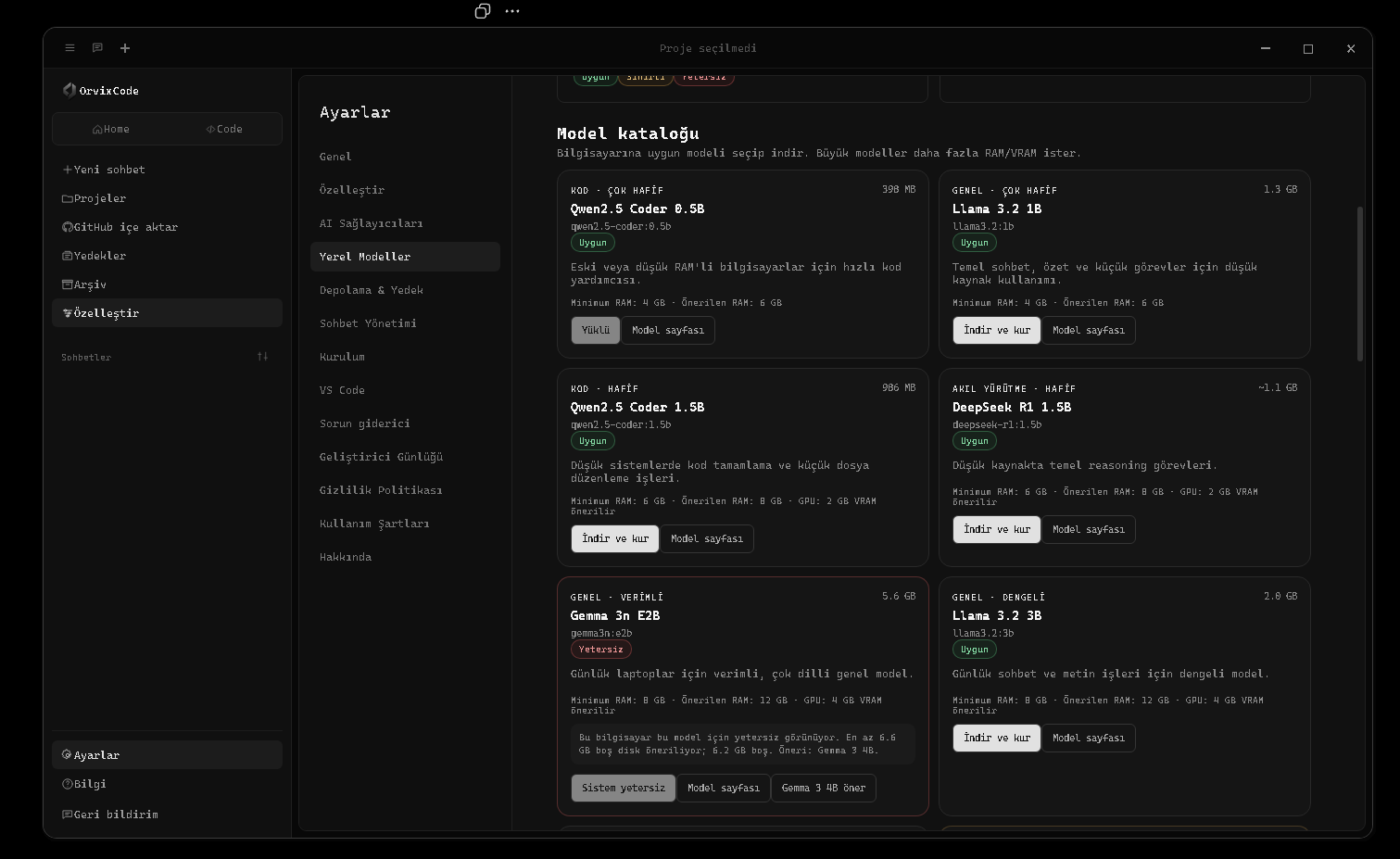
OrvixCode 可通过 Ollama 在本机直接运行受支持的模型。本地模型不需要单独的 AI API 密钥;聊天请求会发送到本地 Ollama 服务。已下载模型会出现在普通模型选择器的 本地 / Ollama 分组中,也可设为默认模型。
本地模型不仅能用于普通聊天,在合适情况下也可用于 Ask / Edit / Agent 流程,以及 Combo 模式中的规划、代码生成或错误检查角色。
第三方模型许可证Orvix Code 不是这些本地模型的所有者或发布者。模型通过 Ollama 从第三方来源下载,每个模型都受其自身许可证和使用条款约束。使用前请查看模型来源页上的最新条款;模型可用性与许可证条件可能随时间变化。
推荐本地模型目录
| 模型 | 类型 | 约下载大小 | 建议 RAM | 建议 VRAM |
|---|---|---|---|---|
| Qwen2.5 Coder 0.5B | 代码 · 超轻量 | 398 MB | 6 GB | 0 GB |
| Llama 3.2 1B | 通用 · 超轻量 | 1.3 GB | 6 GB | 0 GB |
| Qwen2.5 Coder 1.5B | 代码 · 轻量 | 986 MB | 8 GB | 2 GB |
| DeepSeek R1 1.5B | 推理 · 轻量 | ~1.1 GB | 8 GB | 2 GB |
| Gemma 3n E2B | 通用 · 高效 | 5.6 GB | 12 GB | 4 GB |
| Llama 3.2 3B | 通用 · 均衡 | 2.0 GB | 12 GB | 4 GB |
| Phi-4 Mini 3.8B | 通用 / 推理 | 2.5 GB | 12 GB | 4 GB |
| Gemma 3 4B | 通用 · 均衡 | 3.3 GB | 16 GB | 6 GB |
| Gemma 3n E4B | 通用 · 高效强力 | 7.5 GB | 16 GB | 6 GB |
| Qwen2.5 Coder 7B | 代码 · 强力 | 4.7 GB | 16 GB | 6 GB |
| DeepSeek R1 0528 8B | 推理 · 强力 | ~5.2 GB | 16 GB | 6 GB |
| Qwen2.5 Coder 14B | 代码 · 很强 | 9.0 GB | 24 GB | 10 GB |
| DeepSeek R1 14B | 推理 · 很强 | ~9 GB | 24 GB | 10 GB |
| GPT-OSS 20B | 推理 / Agent | 14 GB | 32 GB | 16 GB |
| Qwen2.5 Coder 32B | 代码 · 高端 | 20 GB | 40 GB | 20 GB |
| Qwen3 Coder 30B | 代码 / Agent | 19 GB | 40 GB | 20 GB |
| DeepSeek R1 32B | 推理 · 高端 | ~20 GB | 40 GB | 20 GB |
| GPT-OSS 120B | 推理 / Agent · 工作站 | 65 GB | 96 GB | 48 GB |
| Qwen3 Coder 480B | 代码 / Agent · 极限 | 290 GB | 300 GB | 120 GB |
目录与手动安装模型推荐目录提供一个经过筛选的起始列表。用户手动安装到 Ollama 的兼容模型也可能显示在“已安装模型”中。Qwen2.5 Coder 3B 不在 OrvixCode 推荐目录中。
What you will learn 01Viona · 本機模型
What you will learn 02Local AI · 實作實驗
What you will learn 03進度 · Diff · Test · Review
實作實驗
Use the lesson in a real OrvixCode workspace instead of only reading it.
1Open a small real project and identify where this lesson applies.
2Ask OrvixCode to explain the current state before making changes.
3Apply one controlled change and verify it with the project’s real checks.
Apply the “本機模型” concept to this project. Inspect and explain the current state first. Do not touch unrelated files. Make the smallest safe change, run the relevant build/test/terminal verification, and summarize the real result.
21 Ollama 與本機模型設定Ollama 與本機模型設定 — OrvixCode 的技術使用方式、設定與工作流程說明。
Ollama 與本機模型設定 — OrvixCode 的技術使用方式、設定與工作流程說明。
本地模型中心位于 设置 → 本地模型。OrvixCode 会在这里统一管理 Ollama 运行时、硬件检查、剩余磁盘空间和已安装模型。
- 打开“本地模型” 在设置中的“本地模型”页面检查 Ollama 运行状态。
- 准备 Ollama 如果未安装 Ollama,OrvixCode 可在受支持的 Windows 环境中启动安装流程;完成后会验证本地服务。
- 检查硬件兼容性 模型卡片会评估 RAM 和剩余磁盘。资源不足时可能阻止下载,接近下限时会显示性能警告。
- 下载模型 从目录中选择模型。下载过程中支持暂停、继续和取消。
- 选择模型 安装完成后,模型会出现在主模型选择器的
本地 / Ollama下。
本地运行模型下载完成后,推理和聊天请求会通过本机 Ollama 执行。使用本地模型无需云端提供商的 API 密钥。
本地模型工具
- 启动服务:当 Ollama 未运行时尝试启动它。
- 重新尝试 GPU:在安全 CPU 回退后重新启用 GPU 尝试。
- 打开日志:打开 Ollama 运行日志进行故障排查。
- 模型文件夹:打开本地模型存储位置。
- 兼容性检查:评估 RAM、磁盘和模型要求。
What you will learn 01Viona · Ollama 與本機模型設定
What you will learn 02Local AI · 實作實驗
What you will learn 03進度 · Diff · Test · Review
實作實驗
Use the lesson in a real OrvixCode workspace instead of only reading it.
1Open a small real project and identify where this lesson applies.
2Ask OrvixCode to explain the current state before making changes.
3Apply one controlled change and verify it with the project’s real checks.
Apply the “Ollama 與本機模型設定” concept to this project. Inspect and explain the current state first. Do not touch unrelated files. Make the smallest safe change, run the relevant build/test/terminal verification, and summarize the real result.
22 AI 供應商AI 供應商 — OrvixCode 的技術使用方式、設定與工作流程說明。
AI 供應商 — OrvixCode 的技術使用方式、設定與工作流程說明。
除 Viona 外,OrvixCode 还可在同一提供商中心管理15 个外部 AI 服务。实际模型列表会根据账户/API 权限动态生成,每个提供商最多可显示 5 个适合聊天的模型。
| 提供商 | 用途 |
|---|---|
| Viona | OrvixCode 主模型流程 |
| ChatGPT / OpenAI | 当前 GPT 和 Codex 模型 |
| Google Gemini | 当前 Gemini 模型 |
| Anthropic / Claude | Claude 模型 |
| Groq | GroqCloud 生产模型 |
| Mistral | Mistral 与 Codestral 模型 |
| DeepSeek | 代码与推理模型 |
| xAI / Grok | Grok 聊天与代码模型 |
| Cohere | Command 系列模型 |
| Together AI | 多种开放模型访问 |
| OpenRouter | 通过一个 API 访问多种模型 |
| Perplexity | Sonar 研究模型 |
| Cerebras | 高速推理模型 |
| Fireworks AI | 快速开放模型基础设施 |
| Cloudflare Workers AI | Workers AI 上支持的开放模型 |
| Microsoft Copilot | Microsoft 365 Copilot Chat API(Preview),通过 Microsoft Graph delegated token 连接 |
本地模型独立工作Ollama 模型不需要 API 密钥,并独立于云端提供商显示在 本地 / Ollama 模型分组中。
提供商条款可用性、账户权限、配额、价格、模型名称和 API 条款都可能由对应提供商更改。Microsoft Copilot 在应用中标记为 Preview。
What you will learn 01Viona · AI 供應商
What you will learn 02Local AI · 實作實驗
What you will learn 03進度 · Diff · Test · Review
實作實驗
Use the lesson in a real OrvixCode workspace instead of only reading it.
1Open a small real project and identify where this lesson applies.
2Ask OrvixCode to explain the current state before making changes.
3Apply one controlled change and verify it with the project’s real checks.
Apply the “AI 供應商” concept to this project. Inspect and explain the current state first. Do not touch unrelated files. Make the smallest safe change, run the relevant build/test/terminal verification, and summarize the real result.
23 Combo 模式Combo 模式 — OrvixCode 的技術使用方式、設定與工作流程說明。
Combo 模式 — OrvixCode 的技術使用方式、設定與工作流程說明。
Combo 模式不会把整个任务交给一个模型,而是拆成三个专业阶段:思考/规划、代码生成和错误检查。每个角色都可以使用不同的云端模型或兼容的本地 Ollama 模型。
思考 / 规划:  Viona 或强推理模型
代码生成:      Qwen Coder / Claude / 其他代码模型
错误检查:      Gemini / 本地模型 / 其他审查模型
增强的 Combo 工作流
- 自动角色分配:启用 Combo Auto 后,可以为不同角色自动选择合适模型。
- 本地模型支持:已经下载的 Ollama 模型可用于 Combo 角色。
- 阶段可见:规划、编码和检查阶段可在聊天界面中跟踪。
- Fallback:规划或编码阶段失败时,可通过其他合适阶段/模型恢复流程。
- 检查容错:即使审查模型失败,已经生成的最终答案也不会丢失。
- 回复持久化:防止 Combo 回复因界面动画或状态更新而消失。
建议小型本地模型适合快速预分析或简单检查;更强的代码模型通常更适合主要代码生成角色。
默认状态Combo Mode 默认关闭。可从消息输入框的 + 快速菜单中开启或关闭。
What you will learn 01Viona · Combo 模式
What you will learn 02Local AI · 實作實驗
What you will learn 03進度 · Diff · Test · Review
實作實驗
Use the lesson in a real OrvixCode workspace instead of only reading it.
1Open a small real project and identify where this lesson applies.
2Ask OrvixCode to explain the current state before making changes.
3Apply one controlled change and verify it with the project’s real checks.
Apply the “Combo 模式” concept to this project. Inspect and explain the current state first. Do not touch unrelated files. Make the smallest safe change, run the relevant build/test/terminal verification, and summarize the real result.
24 智慧型自適應內容智慧型自適應內容 — OrvixCode 的技術使用方式、設定與工作流程說明。
智慧型自適應內容 — OrvixCode 的技術使用方式、設定與工作流程說明。
把完整文件树、所有文件内容和很长的对话历史一次性发送给模型效率很低。OrvixCode 会根据任务缩小上下文,并优先保留真正相关的信息。
上下文可优先使用选中代码、光标附近代码、当前文件的相关部分、用户明确点名的文件、与任务相关的项目文件,以及必要的对话历史。
如果 Viona 或其他服务达到请求大小限制,OrvixCode 可以用更小的上下文重试。本地模型则会根据可用内存自动平衡 context。
本地模型内存保护如果检测到本地 llama-server 的 KV cache / CPU buffer 分配错误,OrvixCode 可依次使用更小的 context 重试:
8192 → 6144 → 4096 → 3072 → 2048。成功的安全值可按模型记忆,同时保留针对 GPU/驱动问题的 CPU fallback。What you will learn 01Viona · 智慧型自適應內容
What you will learn 02Local AI · 實作實驗
What you will learn 03進度 · Diff · Test · Review
實作實驗
Use the lesson in a real OrvixCode workspace instead of only reading it.
1Open a small real project and identify where this lesson applies.
2Ask OrvixCode to explain the current state before making changes.
3Apply one controlled change and verify it with the project’s real checks.
Apply the “智慧型自適應內容” concept to this project. Inspect and explain the current state first. Do not touch unrelated files. Make the smallest safe change, run the relevant build/test/terminal verification, and summarize the real result.
25 長程式碼與大型專案長程式碼與大型專案 — OrvixCode 的技術使用方式、設定與工作流程說明。
長程式碼與大型專案 — OrvixCode 的技術使用方式、設定與工作流程說明。
即使提示词很短,只要明确要求大量输出,OrvixCode 也会单独识别。长代码支持不限于 Python,也覆盖 HTML/CSS/JavaScript/TypeScript、Go、Rust、PHP、Ruby、Java/Kotlin、C/C++/C#、Swift、Dart、Lua、Scala、Elixir、F#、Solidity、Bash、PowerShell、SQL 等。
长输出与续写
- 本地模型可在合适情况下使用更高输出预算。
- 如果受 token/context 限制而截断,可从缺失位置继续请求。
- 合并续写片段时会清理重复重叠。
- 未闭合 fenced code block 的内容仍可保留为代码。
大型项目规划
- 分析请求并规划项目结构。
- 创建 manifest / 文件计划。
- 逐文件生成并跟踪依赖与接口。
- 如果 import 暴露缺失本地模块,可扩展计划。
- 达到输出限制时继续生成。
- 最后执行基础一致性检查。
保持聊天视图生成的代码会继续保留在聊天中;生成结束后 OrvixCode 不会自动跳转到代码页面。需要时可手动使用在代码区打开。
模型能力OrvixCode 可以管理规划和续写,但代码质量与可用 context 仍取决于所选模型和硬件。
What you will learn 01Viona · 長程式碼與大型專案
What you will learn 02Local AI · 實作實驗
What you will learn 03進度 · Diff · Test · Review
實作實驗
Use the lesson in a real OrvixCode workspace instead of only reading it.
1Open a small real project and identify where this lesson applies.
2Ask OrvixCode to explain the current state before making changes.
3Apply one controlled change and verify it with the project’s real checks.
Apply the “長程式碼與大型專案” concept to this project. Inspect and explain the current state first. Do not touch unrelated files. Make the smallest safe change, run the relevant build/test/terminal verification, and summarize the real result.
Track checkpoint · 04 · Models & Context
Before moving on, complete these tasks without relying on guesswork.
- Explain the key ideas of this path in your own words.
- Complete one real task using the workflow from this path.
- Verify your result with evidence such as a diff, test, build or terminal output.
Level · 進階
05 · Project Productivity
Work with GitHub, backups, sessions, settings and keyboard workflows on real repositories.
GitHubBackupSessionsWorkflow
26 GitHub 整合GitHub 整合 — OrvixCode 的技術使用方式、設定與工作流程說明。
GitHub 整合 — OrvixCode 的技術使用方式、設定與工作流程說明。
可在创建项目流程中使用 GitHub 导入功能,把仓库下载到本地 OrvixCode 工作区。
导入完成后,仓库会像普通本地项目文件夹一样使用,并可在相关任务中加入 AI 上下文。
What you will learn 01GitHub · GitHub 整合
What you will learn 02Backup · 實作實驗
What you will learn 03進度 · Diff · Test · Review
實作實驗
Use the lesson in a real OrvixCode workspace instead of only reading it.
1Open a small real project and identify where this lesson applies.
2Ask OrvixCode to explain the current state before making changes.
3Apply one controlled change and verify it with the project’s real checks.
Apply the “GitHub 整合” concept to this project. Inspect and explain the current state first. Do not touch unrelated files. Make the smallest safe change, run the relevant build/test/terminal verification, and summarize the real result.
27 備份備份 — OrvixCode 的技術使用方式、設定與工作流程說明。
備份 — OrvixCode 的技術使用方式、設定與工作流程說明。
OrvixCode 可在文件修改过程中保留备份数据,以降低数据丢失风险。根据编辑类型,旧内容可以保留用于恢复。
VS Code 端还提供撤销最近一次 AI 修改的流程。
What you will learn 01GitHub · 備份
What you will learn 02Backup · 實作實驗
What you will learn 03進度 · Diff · Test · Review
實作實驗
Use the lesson in a real OrvixCode workspace instead of only reading it.
1Open a small real project and identify where this lesson applies.
2Ask OrvixCode to explain the current state before making changes.
3Apply one controlled change and verify it with the project’s real checks.
Apply the “備份” concept to this project. Inspect and explain the current state first. Do not touch unrelated files. Make the smallest safe change, run the relevant build/test/terminal verification, and summarize the real result.
28 聊天與工作階段聊天與工作階段 — OrvixCode 的技術使用方式、設定與工作流程說明。
聊天與工作階段 — OrvixCode 的技術使用方式、設定與工作流程說明。
对话与已打开的标签页是独立的。关闭对话标签并不会自动删除历史记录。
- 可从左侧面板重新打开旧对话。
- 可通过右键菜单或设置删除对话。
- 可以同时保持多个对话标签页打开。
- 从 VS Code 同步的对话可在历史记录中以独立标题显示。
What you will learn 01GitHub · 聊天與工作階段
What you will learn 02Backup · 實作實驗
What you will learn 03進度 · Diff · Test · Review
實作實驗
Use the lesson in a real OrvixCode workspace instead of only reading it.
1Open a small real project and identify where this lesson applies.
2Ask OrvixCode to explain the current state before making changes.
3Apply one controlled change and verify it with the project’s real checks.
Apply the “聊天與工作階段” concept to this project. Inspect and explain the current state first. Do not touch unrelated files. Make the smallest safe change, run the relevant build/test/terminal verification, and summarize the real result.
29 設定設定 — OrvixCode 的技術使用方式、設定與工作流程說明。
設定 — OrvixCode 的技術使用方式、設定與工作流程說明。
OrvixCode 的设置主要包括:
- 通用:默认模型、创意度/temperature、打字动画、声音、左侧面板和应用语言。
- 自定义:主题、字体和文字颜色。
- AI 提供商:Viona 与外部提供商、模型刷新和 Combo 设置。
- 本地模型:Ollama 服务、硬件兼容性、模型下载/管理和日志。
- 存储与备份:数据目录和自动文件备份。
- 对话管理:查看和批量删除对话。
- 安装 / VS Code:桌面端与 Visual Studio Code 集成选项。
- 故障排查:本地系统和连接检查。
- 键盘快捷键:可重新分配发送、新建聊天/项目、保存、撤销/重做、运行、终端、停止 AI 回复、Combo 与主要导航等操作。
What you will learn 01GitHub · 設定
What you will learn 02Backup · 實作實驗
What you will learn 03進度 · Diff · Test · Review
實作實驗
Use the lesson in a real OrvixCode workspace instead of only reading it.
1Open a small real project and identify where this lesson applies.
2Ask OrvixCode to explain the current state before making changes.
3Apply one controlled change and verify it with the project’s real checks.
Apply the “設定” concept to this project. Inspect and explain the current state first. Do not touch unrelated files. Make the smallest safe change, run the relevant build/test/terminal verification, and summarize the real result.
30 鍵盤快速鍵鍵盤快速鍵 — OrvixCode 的技術使用方式、設定與工作流程說明。
鍵盤快速鍵 — OrvixCode 的技術使用方式、設定與工作流程說明。
在设置 → 键盘快捷键中可以重新分配主要应用操作。选择一个操作后会打开按键捕获窗口以记录新的组合。
可配置操作示例
- 发送消息 / 新行
- 聚焦消息输入框
- 新建聊天与新建项目
- 添加文件与保存
- Ctrl+Z 撤销 / Ctrl+Y 重做
- 运行代码与打开终端
- 停止 AI 回复
- 切换 Combo Mode
- 文档、反馈与主要页面导航
- 最小化、最大化、关闭或发送到后台/托盘
冲突如果组合已经分配给其他操作,OrvixCode 会检测冲突并提示您。
What you will learn 01GitHub · 鍵盤快速鍵
What you will learn 02Backup · 實作實驗
What you will learn 03進度 · Diff · Test · Review
實作實驗
Use the lesson in a real OrvixCode workspace instead of only reading it.
1Open a small real project and identify where this lesson applies.
2Ask OrvixCode to explain the current state before making changes.
3Apply one controlled change and verify it with the project’s real checks.
Apply the “鍵盤快速鍵” concept to this project. Inspect and explain the current state first. Do not touch unrelated files. Make the smallest safe change, run the relevant build/test/terminal verification, and summarize the real result.
Track checkpoint · 05 · Project Productivity
Before moving on, complete these tasks without relying on guesswork.
- Explain the key ideas of this path in your own words.
- Complete one real task using the workflow from this path.
- Verify your result with evidence such as a diff, test, build or terminal output.
Level · 專家
06 · Security & Control
Protect API keys, permissions and repository boundaries while keeping AI productive.
SecuritySecretsPermissions
31 佈景主題、字型與外觀佈景主題、字型與外觀 — OrvixCode 的技術使用方式、設定與工作流程說明。
佈景主題、字型與外觀 — OrvixCode 的技術使用方式、設定與工作流程說明。
可从 设置 → 自定义 修改 OrvixCode 外观。
| 设置 | 选项 |
|---|---|
| 主题 | Orvix Dark(默认)、Light、Midnight、Midnight Indigo、Graphite、Forest |
| 字体 | Inter、Segoe UI、Arial、Georgia、Cascadia Code |
| 文字颜色 | 使用颜色选择器自定义界面文字颜色 |
| 恢复默认 | 恢复 OrvixCode 默认外观 |
说明外观设置与应用功能独立,不会更改 AI 提供商、项目或对话配置。
What you will learn 01Security · 佈景主題、字型與外觀
What you will learn 02Secrets · 實作實驗
What you will learn 03進度 · Diff · Test · Review
實作實驗
Use the lesson in a real OrvixCode workspace instead of only reading it.
1Open a small real project and identify where this lesson applies.
2Ask OrvixCode to explain the current state before making changes.
3Apply one controlled change and verify it with the project’s real checks.
Apply the “佈景主題、字型與外觀” concept to this project. Inspect and explain the current state first. Do not touch unrelated files. Make the smallest safe change, run the relevant build/test/terminal verification, and summarize the real result.
32 檔案安全性檔案安全性 — OrvixCode 的技術使用方式、設定與工作流程說明。
檔案安全性 — OrvixCode 的技術使用方式、設定與工作流程說明。
OrvixCode 的目标是让 AI 驱动的文件修改保持可见。被修改的文件以及修改结果可显示在对话或变更报告中。
关闭自动应用后,编辑包可先等待用户确认,再写入文件。
What you will learn 01Security · 檔案安全性
What you will learn 02Secrets · 實作實驗
What you will learn 03進度 · Diff · Test · Review
實作實驗
Use the lesson in a real OrvixCode workspace instead of only reading it.
1Open a small real project and identify where this lesson applies.
2Ask OrvixCode to explain the current state before making changes.
3Apply one controlled change and verify it with the project’s real checks.
Apply the “檔案安全性” concept to this project. Inspect and explain the current state first. Do not touch unrelated files. Make the smallest safe change, run the relevant build/test/terminal verification, and summarize the real result.
33 API 金鑰API 金鑰 — OrvixCode 的技術使用方式、設定與工作流程說明。
API 金鑰 — OrvixCode 的技術使用方式、設定與工作流程說明。
外部 AI 提供商需要对应服务提供的 API 密钥或账户访问权限。
不要分享 API 密钥不要把 API 密钥放入源代码、公开 GitHub 仓库、截图或公开网页。
VS Code 扩展会通过 OrvixCode 的连接系统复用现有提供商配置,而不是要求用户把每个密钥分别复制到扩展中。
What you will learn 01Security · API 金鑰
What you will learn 02Secrets · 實作實驗
What you will learn 03進度 · Diff · Test · Review
實作實驗
Use the lesson in a real OrvixCode workspace instead of only reading it.
1Open a small real project and identify where this lesson applies.
2Ask OrvixCode to explain the current state before making changes.
3Apply one controlled change and verify it with the project’s real checks.
Apply the “API 金鑰” concept to this project. Inspect and explain the current state first. Do not touch unrelated files. Make the smallest safe change, run the relevant build/test/terminal verification, and summarize the real result.
34 檔案權限檔案權限 — OrvixCode 的技術使用方式、設定與工作流程說明。
檔案權限 — OrvixCode 的技術使用方式、設定與工作流程說明。
多文件任务可能影响项目中更大的范围。根据 OrvixCode 版本和设置,可以针对单个文件或整个修改方案提供确认流程。
Agent 任务批准多文件修改前,请检查任务范围以及将受影响的文件。
What you will learn 01Security · 檔案權限
What you will learn 02Secrets · 實作實驗
What you will learn 03進度 · Diff · Test · Review
實作實驗
Use the lesson in a real OrvixCode workspace instead of only reading it.
1Open a small real project and identify where this lesson applies.
2Ask OrvixCode to explain the current state before making changes.
3Apply one controlled change and verify it with the project’s real checks.
Apply the “檔案權限” concept to this project. Inspect and explain the current state first. Do not touch unrelated files. Make the smallest safe change, run the relevant build/test/terminal verification, and summarize the real result.
Track checkpoint · 06 · Security & Control
Before moving on, complete these tasks without relying on guesswork.
- Explain the key ideas of this path in your own words.
- Complete one real task using the workflow from this path.
- Verify your result with evidence such as a diff, test, build or terminal output.
Level · 專家
07 · Troubleshooting
Diagnose provider, VS Code, local-model and application failures using evidence instead of guesses.
DebuggingRecoveryDiagnostics
35 一般疑難排解一般疑難排解 — OrvixCode 的技術使用方式、設定與工作流程說明。
一般疑難排解 — OrvixCode 的技術使用方式、設定與工作流程說明。
AI 没有响应
- 确认当前模型已选中并且可用。
- 使用云端模型时,检查提供商 API 密钥或会话权限。
- 使用本地模型时,在“设置 → 本地模型”中确认 Ollama 服务正在运行。
- 在 VS Code 中运行测试连接。
- 查看扩展面板或 OrvixCode 故障排查工具中的错误详情。
文件修改没有应用
- 检查编辑包状态。
- 如果 Auto Apply 已启用,修改可能已经应用。
- 确认文件具有写入权限。
- 在 VS Code 中检查 Workspace Trust。
- 通过 Diff / 预览检查 AI 建议,然后重新应用。
What you will learn 01Debugging · 一般疑難排解
What you will learn 02Recovery · 實作實驗
What you will learn 03進度 · Diff · Test · Review
實作實驗
Use the lesson in a real OrvixCode workspace instead of only reading it.
1Open a small real project and identify where this lesson applies.
2Ask OrvixCode to explain the current state before making changes.
3Apply one controlled change and verify it with the project’s real checks.
Apply the “一般疑難排解” concept to this project. Inspect and explain the current state first. Do not touch unrelated files. Make the smallest safe change, run the relevant build/test/terminal verification, and summarize the real result.
36 Viona 要求大小限制Viona 要求大小限制 — OrvixCode 的技術使用方式、設定與工作流程說明。
Viona 要求大小限制 — OrvixCode 的技術使用方式、設定與工作流程說明。
当当前文件、项目上下文和对话历史合并后过大时,可能出现这个错误。
当前 OrvixCode 上下文系统可以自动缩小大型上下文,并在 Viona 返回 413 后使用更小级别重试。
最佳效果处理超大文件时,先选中真正需要编辑的区域再发送给 AI。选中代码会获得最高上下文优先级。
What you will learn 01Debugging · Viona 要求大小限制
What you will learn 02Recovery · 實作實驗
What you will learn 03進度 · Diff · Test · Review
實作實驗
Use the lesson in a real OrvixCode workspace instead of only reading it.
1Open a small real project and identify where this lesson applies.
2Ask OrvixCode to explain the current state before making changes.
3Apply one controlled change and verify it with the project’s real checks.
Apply the “Viona 要求大小限制” concept to this project. Inspect and explain the current state first. Do not touch unrelated files. Make the smallest safe change, run the relevant build/test/terminal verification, and summarize the real result.
37 VS Code 疑難排解VS Code 疑難排解 — OrvixCode 的技術使用方式、設定與工作流程說明。
VS Code 疑難排解 — OrvixCode 的技術使用方式、設定與工作流程說明。
扩展搜索不到
刷新扩展页面,检查网络连接,然后再次搜索 OrvixCode。新版本发布后,Marketplace 索引可能需要一点时间。
扩展提示“workspace is not trusted”
项目可能处于 Restricted Mode。通过 Workspace Trust 信任该项目后,文件编辑功能才会启用。
面板能打开,但 AI 没有响应
先运行“测试连接”。云端模型请检查网络和提供商访问;本地模型请检查桌面版 OrvixCode 连接以及 Ollama 服务状态。
输入“你好”后却显示了项目/system prompt
当前扩展会把简单聊天与项目上下文隔离。当前文件、workspace 和内部 orvix-edit 指令不会附加到无关的问候消息。如果更新后仍出现旧行为,请完全重启 VS Code,或运行 Developer: Reload Window。
代码修改没有应用
确认项目已被信任、文件不是只读,并且 OrvixCode 有编辑权限。如果 Auto Apply 已开启,修改也可能已经应用。
右键命令打开面板但没有开始执行
确认已经选中代码后再试。如果问题仍存在,在 OrvixCode 面板中新建对话并直接发送相同请求,然后运行“测试连接”。
What you will learn 01Debugging · VS Code 疑難排解
What you will learn 02Recovery · 實作實驗
What you will learn 03進度 · Diff · Test · Review
實作實驗
Use the lesson in a real OrvixCode workspace instead of only reading it.
1Open a small real project and identify where this lesson applies.
2Ask OrvixCode to explain the current state before making changes.
3Apply one controlled change and verify it with the project’s real checks.
Apply the “VS Code 疑難排解” concept to this project. Inspect and explain the current state first. Do not touch unrelated files. Make the smallest safe change, run the relevant build/test/terminal verification, and summarize the real result.
38 本機模型疑難排解本機模型疑難排解 — OrvixCode 的技術使用方式、設定與工作流程說明。
本機模型疑難排解 — OrvixCode 的技術使用方式、設定與工作流程說明。
Ollama 没有运行
打开“设置 → 本地模型”检查运行时状态,并使用启动服务。如果仍失败,请打开日志并确认模型确实已经安装。
“failed to allocate buffer / kv cache”
这通常表示模型或 context 对当前 RAM/VRAM 来说过大。OrvixCode 可以自动降低 context 后重试,并按模型记住可工作的安全值。
8192 → 6144 → 4096 → 3072 → 2048
如果模型本身无法装入内存,就需要选择更小模型。关闭其他占用大量内存的程序也可能有帮助。
CUDA / GPU 错误
检测到 GPU、CUDA 或本地 runner 故障时,OrvixCode 可使用安全 CPU 模式重试。之后可在“本地模型”中使用重新尝试 GPU恢复 GPU 尝试。
本地模型非常慢
- 尝试更小的模型。
- 查看模型卡片上的 RAM/VRAM 建议。
- 关闭其他占用大量内存的应用。
- 如果有兼容 GPU,确认 GPU 重试已启用。
What you will learn 01Debugging · 本機模型疑難排解
What you will learn 02Recovery · 實作實驗
What you will learn 03進度 · Diff · Test · Review
實作實驗
Use the lesson in a real OrvixCode workspace instead of only reading it.
1Open a small real project and identify where this lesson applies.
2Ask OrvixCode to explain the current state before making changes.
3Apply one controlled change and verify it with the project’s real checks.
Apply the “本機模型疑難排解” concept to this project. Inspect and explain the current state first. Do not touch unrelated files. Make the smallest safe change, run the relevant build/test/terminal verification, and summarize the real result.
39 常見問題常見問題 — OrvixCode 的技術使用方式、設定與工作流程說明。
常見問題 — OrvixCode 的技術使用方式、設定與工作流程說明。
部分功能可以。如果使用已经下载的 Ollama 本地模型,推理和聊天可在本机运行。云端 AI 提供商和新模型下载需要网络。
不需要。OrvixCode 有自己的桌面界面,VS Code 集成只是可选功能。
可以。当提示词明确要求修改时,Ask 模式可准备可应用的编辑包。
Agent 模式专门用于跨多个文件的任务。
启用同步后,VS Code 聊天和编辑事件可传输到桌面历史记录。
不需要。通过 Ollama 运行的本地模型不需要单独的 AI API 密钥。
选择本地模型时,请求会发送到本机 Ollama 服务。如果另外选择云端提供商,该请求所需的上下文可能发送到对应提供商 API。
支持。OrvixCode 支持 Microsoft 365 Copilot Chat API(Preview)。访问取决于 Microsoft Graph delegated token 以及 Microsoft 账户可用的相关权限和服务。
支持。系统会单独识别长代码意图;本地模型在合适情况下可使用更高输出预算和自动续写。最终质量仍取决于所选模型。
在 Visual Studio Code 扩展页面搜索 OrvixCode 即可。使用 AI 功能还需要在电脑上安装 OrvixCode 桌面应用。
What you will learn 01Debugging · 常見問題
What you will learn 02Recovery · 實作實驗
What you will learn 03進度 · Diff · Test · Review
實作實驗
Use the lesson in a real OrvixCode workspace instead of only reading it.
1Open a small real project and identify where this lesson applies.
2Ask OrvixCode to explain the current state before making changes.
3Apply one controlled change and verify it with the project’s real checks.
Apply the “常見問題” concept to this project. Inspect and explain the current state first. Do not touch unrelated files. Make the smallest safe change, run the relevant build/test/terminal verification, and summarize the real result.
Track checkpoint · 07 · Troubleshooting
Before moving on, complete these tasks without relying on guesswork.
- Explain the key ideas of this path in your own words.
- Complete one real task using the workflow from this path.
- Verify your result with evidence such as a diff, test, build or terminal output.
Level · 進階
08 · Platform & Release Operations
Understand Learn, service status, releases and how the OrvixCode platform communicates changes.
LearnStatusReleases
40 OrvixCode 學習中心透過 OrvixCode Learn 學習 Ask、Edit、Agent、專案脈絡、終端機、本機模型與安全開發流程。
透過 OrvixCode Learn 學習 Ask、Edit、Agent、專案脈絡、終端機、本機模型與安全開發流程。
OrvixCode Learn 以可直接閱讀與實作的分步課程補充參考文件,不需要影片。
OrvixCode Learn開啟 OrvixCode Learn →
What you will learn 01Learn · OrvixCode 學習中心
What you will learn 02Status · 實作實驗
What you will learn 03進度 · Diff · Test · Review
實作實驗
Use the lesson in a real OrvixCode workspace instead of only reading it.
1Open a small real project and identify where this lesson applies.
2Ask OrvixCode to explain the current state before making changes.
3Apply one controlled change and verify it with the project’s real checks.
Apply the “OrvixCode 學習中心” concept to this project. Inspect and explain the current state first. Do not touch unrelated files. Make the smallest safe change, run the relevant build/test/terminal verification, and summarize the real result.
41 公告與服務狀態查看 OrvixCode 服務即時狀態、維護通知、更新與緊急公告。
查看 OrvixCode 服務即時狀態、維護通知、更新與緊急公告。
What you will learn 01Learn · 公告與服務狀態
What you will learn 02Status · 實作實驗
What you will learn 03進度 · Diff · Test · Review
實作實驗
Use the lesson in a real OrvixCode workspace instead of only reading it.
1Open a small real project and identify where this lesson applies.
2Ask OrvixCode to explain the current state before making changes.
3Apply one controlled change and verify it with the project’s real checks.
Apply the “公告與服務狀態” concept to this project. Inspect and explain the current state first. Do not touch unrelated files. Make the smallest safe change, run the relevant build/test/terminal verification, and summarize the real result.
42 版本與最新下載透過 Microsoft Store 安裝最新穩定版 OrvixCode。
透過 Microsoft Store 安裝最新穩定版 OrvixCode。
站點下載按鈕使用中央發布設定。管理員發布新的穩定版本後,版本號與下載目標會在整個平台同步更新。
https://orvixcode.orvixgames.com/download.php?lang=zh-tw
What you will learn 01Learn · 版本與最新下載
What you will learn 02Status · 實作實驗
What you will learn 03進度 · Diff · Test · Review
實作實驗
Use the lesson in a real OrvixCode workspace instead of only reading it.
1Open a small real project and identify where this lesson applies.
2Ask OrvixCode to explain the current state before making changes.
3Apply one controlled change and verify it with the project’s real checks.
Apply the “版本與最新下載” concept to this project. Inspect and explain the current state first. Do not touch unrelated files. Make the smallest safe change, run the relevant build/test/terminal verification, and summarize the real result.
Track checkpoint · 08 · Platform & Release Operations
Before moving on, complete these tasks without relying on guesswork.
- Explain the key ideas of this path in your own words.
- Complete one real task using the workflow from this path.
- Verify your result with evidence such as a diff, test, build or terminal output.
CAPSTONE
結業專案
Finish the academy with larger projects that combine multiple OrvixCode skills.
Project 1
Build a real product from zero
Objective: Use OrvixCode Agent to build a small real web product and finish it with a verification loop.
- Turn requirements into a plan first.
- Implement at least three user-facing features.
- Verify responsive behavior.
- Run build/tests or browser-console checks.
- Report the final diff and changed files.
Project 2
Bug hunt in an existing repository
Objective: Enter an unfamiliar project, reproduce a bug, make the smallest safe fix and add regression coverage.
- Analyze repository structure first.
- Record a reproducible failure.
- Explain root cause before editing.
- Apply a minimal patch.
- Run the same verification again.
Project 3
Local model and provider resilience
Objective: Exercise local-model, provider fallback and Agent recovery paths with real failure scenarios.
- Create an empty-response scenario.
- Observe provider timeout and fallback.
- Check tool-call compatibility.
- Collect evidence from developer logs.
- Do not accept silent failure.
Project 4
Large-repo refactor and security review
Objective: Plan and execute a multi-file refactor, verify it, then run a separate security and permission review.
- Map affected files first.
- Write down public behavior constraints.
- Work in small patches.
- Run tests/build/typecheck.
- Review secrets, permissions and unrelated file changes.
ORVIXCODE ACADEMY · CERTIFICATE
結業證書
Complete every lesson to unlock a printable completion certificate.

ORVIXCODEOrvixCode Academy
學院結業
ORVIXCODE
ACADEMY
COMPLETION
ACADEMY
COMPLETION
ORVIXCODE ACADEMY
結業證書
謹向以下學員頒發此證書
—
表彰其成功完成 OrvixCode 學院完整課程,並在 AI 輔助軟體開發、除錯、測試與安全程式設計方面展現實務能力。
42完成課程
8學習路徑
14+預估學習 · 小時
OrvixCode
Orvix Games AI Studio
Academy & Platform
Issued by OrvixCode Academy · orvixcode.orvixgames.com